
AI CRM Comparison: HubSpot vs Pipedrive vs Custom CRM
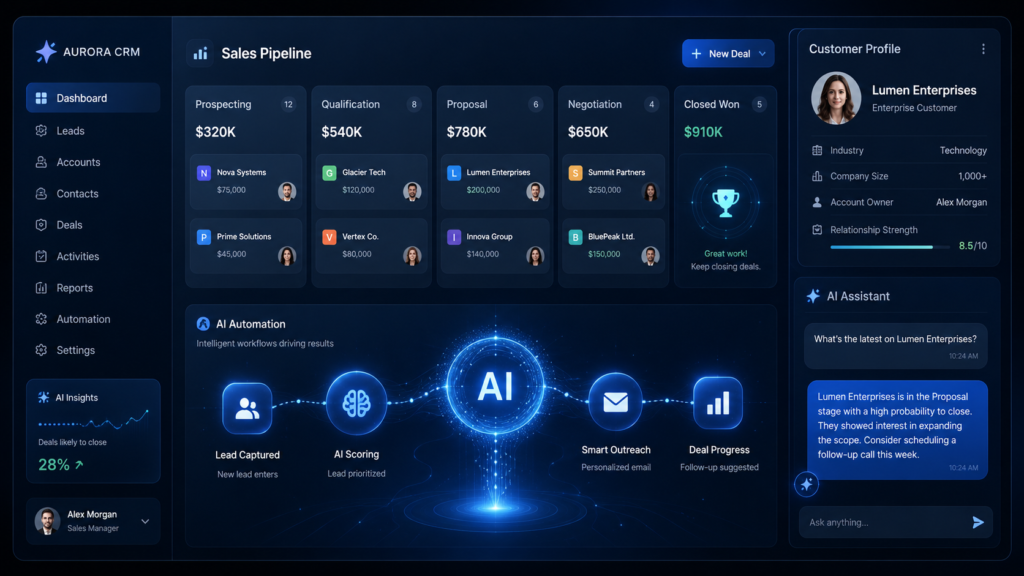
A CRM is no longer just a place to store customer names, phone numbers, emails, and sales notes. In 2026, the best AI-powered CRM systems can help sales teams prioritize leads, write follow-up emails, summarize customer conversations, automate repetitive work, predict deal outcomes, and improve customer service without hiring a large operations team.
That is why many businesses are now comparing tools like HubSpot, Pipedrive, Salesforce, Zoho CRM, and Freshsales with custom CRM software development. Some companies want a ready-made platform they can start using quickly. Others need a custom CRM because their sales process, compliance requirements, reporting logic, or customer journey is too specific for standard CRM software.
The real question is not only “Which CRM is best?” The better question is: which CRM fits your business model, team size, sales process, budget, and future AI automation goals?
Content label: Structured comparison. This guide compares vendor documentation, public plan information, and workflow fit. Realaiva did not run every CRM in a controlled hands-on test, so the recommendations below are conditional and vendor performance claims are not treated as independently verified results.
You will see one declared business scenario, a weighted decision rubric, current pricing references, and a build-versus-buy cost model. Use the framework with your own users, integrations, data requirements, and trial results before committing.
What Is an AI-Powered CRM System?
An AI-powered CRM system is customer relationship management software that uses artificial intelligence to improve sales, marketing, support, and customer data operations.
A traditional CRM helps you store and manage customer data. An AI CRM helps you understand and act on that data.
For example, an AI CRM can:
- Score leads based on buying intent
- Recommend which deals need attention
- Summarize calls, emails, and meetings
- Draft personalized sales emails
- Automate follow-ups
- Detect customer sentiment
- Route support requests
- Power CRM chatbots for customer service
- Forecast revenue based on pipeline activity
- Identify duplicate or incomplete customer records
In simple words, traditional CRM tells you what happened. AI CRM helps you decide what to do next.
Quick AI CRM Comparison for One Business Scenario
Scenario used: a 12-person B2B service company with five CRM users, about 800 active contacts, Gmail, website lead forms, one main sales pipeline, automated follow-ups, manager reporting, and no dedicated CRM administrator.
Editorial scoring rubric: workflow fit 25%, ease of adoption 20%, automation and AI 20%, integrations 15%, governance and control 10%, and cost clarity 10%. Scores are documentation-based fit estimates for this scenario—not universal product-quality scores.
| Option | Scenario fit / 5 | Why it fits | Main limitation to test | Pricing status checked |
|---|---|---|---|---|
| HubSpot | 4.4 | Strong combined CRM, forms, marketing and service workflow | Paid seats, onboarding and AI-credit costs can grow | Free and paid per-seat plans; official page checked Aug. 10, 2026 |
| Pipedrive | 4.3 | Focused pipeline management and easier sales-team adoption | Some lead, campaign and document functions are add-ons | 14-day trial; regional per-seat pricing checked Aug. 10, 2026 |
| Freshsales | 4.1 | Sales engagement, communication and clear SMB tiers | Confirm which Freddy AI features or sessions cost extra | Free plan plus paid annual tiers from $9/user/month on the checked USD page |
| Zoho CRM | 4.0 | Broad customization and business-app ecosystem | AI availability differs by edition and user type | Free for three users; regional paid plans checked Aug. 10, 2026 |
| Salesforce | 3.3 | Deep governance, customization and enterprise expansion | Administration, add-ons and implementation can exceed this scenario’s needs | Multiple annual per-user editions and AI add-ons checked Aug. 10, 2026 |
| Custom CRM | 2.9 initially | Maximum control when the process is genuinely unique | Discovery, delivery, security, migration and maintenance remain your responsibility | Requires scoped vendor or internal engineering estimate |
1. HubSpot Smart CRM
HubSpot is one of the strongest choices for businesses that want CRM, marketing, sales, customer service, website tools, and automation in one ecosystem.
Its biggest advantage is usability. A small business can start with contact management, deal tracking, forms, email marketing, and basic automation without needing a technical team. As the business grows, HubSpot can expand into Sales Hub, Marketing Hub, Service Hub, Content Hub, and more.
Best Use Cases
HubSpot is a strong fit for:
- Startups moving away from spreadsheets
- Small businesses that need sales and marketing in one place
- Agencies managing leads from forms, landing pages, and email campaigns
- Companies that want CRM chatbots and marketing automation
- Teams that value ease of use over deep technical customization
AI Features
HubSpot’s AI layer, Breeze, is designed to help marketing, sales, and service teams work faster. It can support content generation, customer support, CRM data assistance, lead research, and workflow automation.
For implementation examples, see Realaiva’s guide to automating business tasks with AI.
Practical examples:
- A sales rep can summarize a long email thread before calling a lead.
- A marketing team can generate campaign ideas based on customer segments.
- A service team can use AI to help respond to common customer questions.
- A founder can review CRM activity and quickly identify stale deals.
HubSpot vs Pipedrive
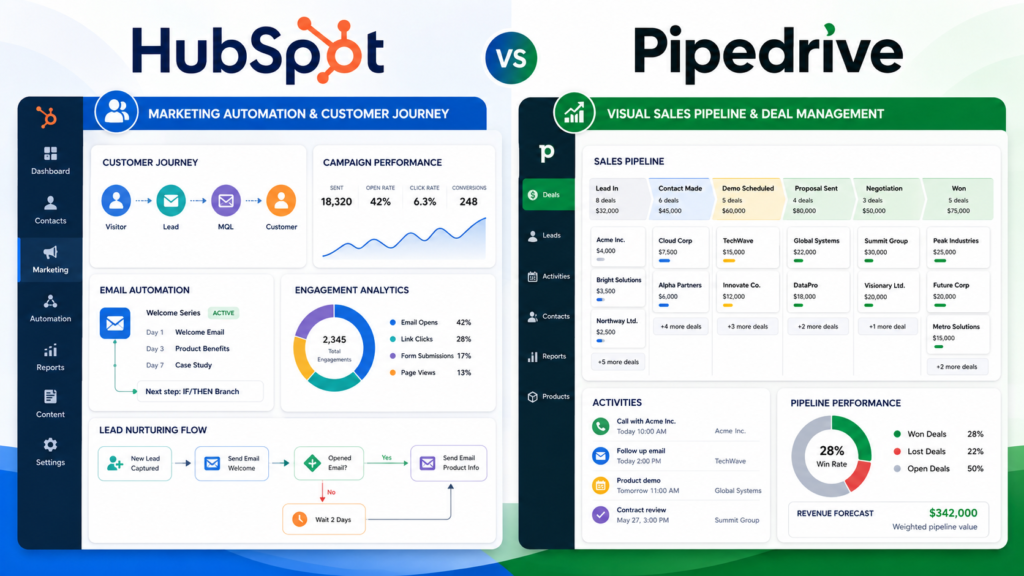
HubSpot is better if you need marketing plus CRM. Pipedrive is better if your main priority is simple sales pipeline management.
Choose HubSpot if your business depends heavily on landing pages, email nurturing, forms, content, lead magnets, and customer service workflows.
Choose Pipedrive if your team mainly needs to manage deals, calls, follow-ups, and sales activities.
2. Pipedrive
Pipedrive is a sales-first CRM built around pipeline visibility. It is especially useful for teams that want a simple, visual way to manage deals.
Where some CRMs become heavy and complex, Pipedrive keeps the sales process clear. You can create deal stages, move opportunities across the pipeline, assign activities, track communication, and monitor sales performance.
Best Use Cases
Pipedrive is a good choice for:
- Small and mid-sized sales teams
- B2B service businesses
- Agencies
- Consultants
- Real estate teams
- Companies that want deal tracking without heavy CRM complexity
AI Features
Pipedrive’s AI features focus on helping salespeople save time and close deals faster.
Common AI use cases include:
- AI email writing
- Email thread summarization
- Sales Assistant insights
- Deal prioritization
- Sales activity recommendations
- Lead and deal automation
- CRM chatbot support for capturing leads
Practical Example
Imagine a web design agency has 80 active leads. Without AI, the team checks each deal manually. With Pipedrive’s AI assistant and automation, the team can identify which deals are active, which ones are going cold, and which follow-up should happen next.
This is where Pipedrive becomes useful: it keeps salespeople focused on selling instead of manually checking spreadsheets and old notes.
3. Salesforce Sales Cloud and Agentforce
Salesforce is one of the most powerful CRM platforms in the world. It is built for companies that need deep customization, complex reporting, strong integrations, enterprise security, and advanced automation.
For small businesses, Salesforce can feel expensive and overwhelming. For larger businesses, it can become the central operating system for sales, customer service, marketing, partner management, analytics, and AI workflows.
Best Use Cases
Salesforce is best for:
- Large sales teams
- Enterprises
- Regulated industries
- Multi-region businesses
- Companies with complex approval workflows
- Organizations needing advanced reporting and governance
- Businesses that want enterprise-grade AI agents
AI Features
Salesforce’s AI ecosystem includes Agentforce, Einstein-style intelligence, predictive insights, automation, and CRM-connected AI agents.
Practical examples:
- An AI agent can help summarize an opportunity.
- A sales manager can get pipeline insights from CRM data.
- A service team can automate repetitive customer requests.
- A company can build AI agents connected to internal business data.
Main Advantage
Salesforce is not just a CRM. It is a highly customizable enterprise platform.
Main Limitation
The same power that makes Salesforce attractive can also make it difficult. You may need implementation consultants, admins, developers, and proper training. For a small business with a simple sales process, Salesforce may be more CRM than you actually need.
4. Zoho CRM
Zoho CRM is a strong option for businesses that want affordability, customization, and a broad business software ecosystem. Zoho offers tools for CRM, email, accounting, support, campaigns, forms, analytics, and more.
The biggest advantage of Zoho CRM is value. It can support small businesses, growing teams, and companies already using Zoho apps.
Best Use Cases
Zoho CRM is useful for:
- Small businesses with limited budgets
- Teams already using Zoho apps
- Companies needing sales, support, and marketing workflows
- Businesses wanting customization without Salesforce-level cost
- Teams that need AI features but still care about affordability
AI Features
Zoho’s AI assistant, Zia, can help with:
- Sales predictions
- Forecasting
- Workflow creation
- Customer information retrieval
- Call transcription intelligence
- Customer sentiment and intent analysis
- Vision AI for extracting and validating information from images
- Generative AI actions inside CRM workflows
Practical Example
A travel agency could use Zoho CRM to collect leads from Facebook forms, WhatsApp, and website inquiries. Zia can help prioritize leads, summarize customer communication, and suggest follow-up actions based on travel dates, destination interest, and previous interactions.
5. Freshsales
Freshsales by Freshworks is a modern sales CRM that combines contact management, sales pipelines, communication tools, and AI features through Freddy AI.
It is especially attractive for small and mid-sized teams that want a clean CRM with built-in sales engagement features.
Best Use Cases
Freshsales works well for:
- SMB sales teams
- SaaS companies
- Service businesses
- Teams needing built-in communication features
- Businesses that want CRM plus customer engagement tools
- Companies already using Freshworks products
AI Features
Freshsales includes Freddy AI features such as:
- Sales email assistance
- Text improvement
- Deal insights
- Forecasting insights
- AI-powered engagement
- Customer-facing AI agent sessions through add-ons
Practical Example
A B2B software company can use Freshsales to track demo requests, automatically assign leads, send follow-up emails, and use AI-powered deal insights to understand which opportunities are most likely to close.
Freshsales is a strong middle-ground option: easier than Salesforce, more sales-focused than a generic database, and more AI-ready than basic contact management tools.
HubSpot vs Pipedrive: Which CRM Is Better?
HubSpot and Pipedrive are often compared because both are popular with startups, small businesses, agencies, and sales teams.
The better option depends on your business model.
Choose HubSpot If:
- You want marketing and CRM in one platform
- You publish content and capture inbound leads
- You need landing pages, forms, newsletters, and lead nurturing
- You want customer service and CRM data in the same ecosystem
- Your team needs a beginner-friendly CRM
Choose Pipedrive If:
- You mainly care about sales pipeline management
- You want a simple deal-focused CRM
- Your sales reps need a clean visual pipeline
- You do not need advanced marketing automation
- You want faster sales adoption with less complexity
Simple Verdict
HubSpot is better for inbound marketing and all-in-one growth operations.
Pipedrive is better for focused sales pipeline execution.
Custom CRM System vs Market-Ready CRM: Which One Is Worth the Investment?
A market-ready CRM is software like HubSpot, Pipedrive, Salesforce, Zoho, or Freshsales. You subscribe, configure it, import your data, and start using it.
A custom CRM is software built specifically for your business process.
Both options can be smart. The wrong choice depends on your stage, budget, and complexity.
Market-Ready CRM Is Better When:
- You need to launch quickly
- Your sales process is standard
- Your team is small
- You do not want to manage software development
- You need proven integrations
- Your budget is limited
- You want vendor support and automatic updates
Custom CRM Is Better When:
- Your workflows are unique
- You have industry-specific compliance requirements
- You need deep integration with internal systems
- You want full control over data and features
- Your team has outgrown off-the-shelf tools
- You need a CRM that supports custom AI logic
- You want to own the product instead of paying rising subscription costs forever
Investment Verdict
For most small businesses, start with a market-ready CRM.
For scaling companies with complex workflows, custom CRM software can become worth the investment when the cost of forcing your process into a generic CRM becomes higher than building your own system.
Types of CRM Systems: Which One Is Right for You?
Before you create a CRM or buy one, understand the main CRM types.
1. Operational CRM
An operational CRM helps manage daily sales, marketing, and customer support activities.
Use it for:
- Lead management
- Contact management
- Sales pipelines
- Email automation
- Customer support tickets
- Follow-up reminders
Best for: small businesses, agencies, sales teams, and service companies.
2. Analytical CRM
An analytical CRM focuses on customer data, reporting, forecasting, and decision-making.
Use it for:
- Revenue forecasting
- Customer segmentation
- Sales performance analysis
- Churn prediction
- Campaign performance
- Customer lifetime value analysis
Best for: data-driven teams and companies with large customer databases.
3. Collaborative CRM
A collaborative CRM helps different departments share customer information.
Use it for:
- Sales-to-support handoff
- Internal notes
- Shared customer timelines
- Multi-team communication
- Account management
Best for: companies where sales, support, marketing, and operations all touch the customer.
4. Strategic CRM
A strategic CRM supports long-term customer relationship planning.
Use it for:
- Retention campaigns
- Loyalty programs
- Customer success planning
- Upsell and cross-sell strategies
- Account-based marketing
Best for: B2B companies, SaaS businesses, and enterprise account teams.
Features to Look for in Custom CRM Software Development
If you are planning custom CRM software development, do not start with coding. Start with features and workflows.
A useful custom CRM should include only what your business actually needs. Too many unnecessary features will increase cost, slow development, and confuse users.
Core CRM Features
Your custom CRM should usually include:
- Contact management
- Lead management
- Deal pipeline
- Company records
- Activity timeline
- Tasks and reminders
- Notes and file attachments
- User roles and permissions
- Search and filters
- Reporting dashboard
- Email integration
- Calendar integration
AI CRM Features
For an AI-powered CRM, consider:
- AI lead scoring
- Email summarization
- Call transcription
- Sentiment analysis
- AI follow-up suggestions
- Deal risk alerts
- Customer service chatbot
- AI knowledge base
- Automated data cleaning
- Duplicate record detection
- Revenue forecasting
- Natural language CRM search
Advanced Features
For larger teams, you may need:
- Multi-branch access
- Approval workflows
- Custom objects
- Audit logs
- API integrations
- ERP integration
- WhatsApp integration
- Payment integration
- Role-based dashboards
- Mobile app
- Offline access
- Data export controls
- Compliance reporting
Things to Consider Before Custom CRM App Development
Building a CRM is not just a software project. It is an operations project.
Before starting custom CRM app development, consider these points.
1. Your Actual Sales Process
Do not copy another company’s CRM workflow. Map your own customer journey.
Ask:
- Where do leads come from?
- Who qualifies them?
- What makes a lead sales-ready?
- How many follow-ups are needed?
- When does a deal move to the next stage?
- What happens after the sale?
2. User Adoption
A CRM fails when the team does not use it.
Keep the interface simple. Avoid making every field required. Make the CRM easier than spreadsheets, not harder.
3. Data Quality
AI is only useful when CRM data is clean.
Before adding AI features, define:
- Required fields
- Duplicate rules
- Naming standards
- Data ownership
- Update frequency
- Import/export rules
4. Security and Permissions
Not every user should see everything.
Your CRM should include:
- Role-based access
- Admin permissions
- Audit logs
- Secure authentication
- Data backup
- API security
- Encryption for sensitive information
5. Integrations
A CRM becomes more valuable when it connects with your existing tools.
Common integrations include:
- Gmail or Outlook
- Google Calendar
- Website forms
- Facebook Lead Ads
- Stripe
- QuickBooks
- ERP systems
- Customer support tools
- VoIP or AI phone agents
6. AI Readiness
Before adding AI, ask what outcome you want.
Bad goal: “Add AI to our CRM.”
Better goal: “Use AI to identify which leads are most likely to book a demo this week.”
AI should solve a business problem, not just become a buzzword.
How to Use AI to Optimize Your CRM?
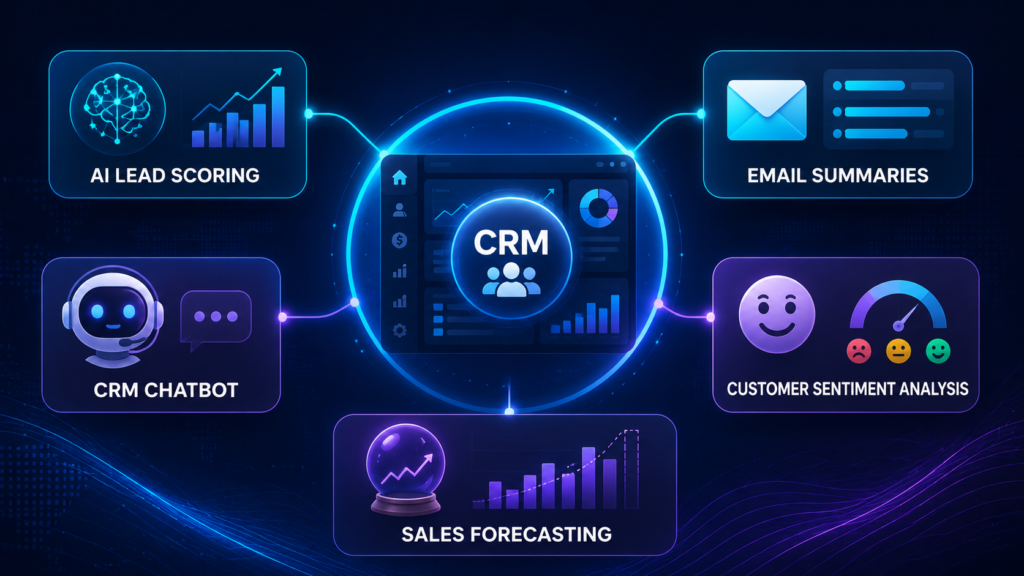
AI can improve your CRM in practical ways if you apply it to specific workflows.
1. Lead Scoring
AI can analyze customer behavior, source, industry, budget, engagement, and past conversion patterns to rank leads.
Example: A real estate agency can prioritize leads who viewed multiple listings, submitted a phone number, and asked about financing.
2. Automated Follow-Ups
AI can draft follow-up emails or messages based on the last conversation.
Example: If a customer asked about pricing but did not reply, AI can suggest a polite follow-up with a case study or discount deadline.
3. CRM Chatbots
CRM chatbots can answer basic questions, collect lead information, and push customer data into the CRM.
Example: A salon can use a chatbot to collect name, service type, preferred date, and phone number before a human confirms the appointment.
4. Customer Service Automation
AI can classify support tickets, suggest replies, and detect angry or urgent messages.
Example: A SaaS company can route billing complaints to finance and technical bugs to support automatically.
5. Forecasting
AI can help sales managers estimate future revenue based on deal stage, activity history, and past win rates.
Example: If deals in the proposal stage usually close within 20 days, the CRM can forecast expected revenue for the month.
6. Data Cleaning
AI can detect duplicate contacts, missing fields, outdated company names, and inconsistent formatting.
Example: If one lead appears as “Ali Khan,” “A. Khan,” and “Ali K,” AI-assisted deduplication can help merge records.
7. Natural Language Search
Instead of using complex filters, users can ask questions like:
“Show me all warm leads from last month who requested a demo but did not receive a follow-up.”
This makes CRM data easier for non-technical teams to use.
How to Create a CRM: Simple Step-by-Step Guide
If you want to know how to create a CRM, start with the business process before choosing tools or developers.
Step 1: Define the CRM Goal
Decide what problem the CRM must solve.
Examples:
- Track leads better
- Improve follow-up speed
- Reduce missed calls
- Automate customer support
- Improve sales forecasting
- Replace spreadsheets
- Centralize customer data
Step 2: Map Your Customer Journey
Write down every stage from first contact to closed deal.
Example:
Lead captured → Qualified → Demo booked → Proposal sent → Negotiation → Closed won/lost → Onboarding → Retention
Step 3: Choose Your CRM Type
Decide whether you need:
- Operational CRM
- Analytical CRM
- Collaborative CRM
- Strategic CRM
- A hybrid CRM
Step 4: List Required Features
Separate features into three groups:
Must-have:
- Contacts
- Leads
- Pipeline
- Tasks
- Notes
- Dashboard
Should-have:
- Email sync
- WhatsApp integration
- Reports
- Role permissions
- Automation
Future features:
- AI lead scoring
- Chatbot
- Call transcription
- Mobile app
- Advanced analytics
Step 5: Decide Build vs Buy
Use a ready-made CRM if you want speed and lower upfront cost.
Build a custom CRM if you need unique workflows, data ownership, custom AI, and deep integrations.
Step 6: Design the CRM Database
A basic CRM database usually includes:
- Users
- Contacts
- Companies
- Leads
- Deals
- Activities
- Notes
- Tasks
- Messages
- Files
- Pipelines
- Reports
Step 7: Build the CRM Interface
The interface should be simple.
Important screens:
- Dashboard
- Contacts list
- Lead profile
- Deal pipeline
- Task board
- Reports
- Settings
- User management
Step 8: Add Automation
Start with simple automation.
Examples:
- Create a task when a new lead arrives
- Send reminder if no follow-up happens in 24 hours
- Assign leads by location or source
- Move deals automatically after a meeting is booked
- Send notification when a high-value lead submits a form
Step 9: Add AI Features
Do not add all AI features at once.
Start with one or two high-impact features:
- AI lead scoring
- AI email drafting
- AI chatbot
- AI call summaries
- AI deal risk alerts
Step 10: Test With Real Users
Before launching company-wide, test the CRM with a small team.
Check:
- Is the CRM easy to use?
- Are important fields missing?
- Are users entering data correctly?
- Are automations working?
- Are reports accurate?
- Are permissions correct?
6 Key Phases of Custom CRM Software Development Process
A proper custom CRM software development process usually includes six phases.
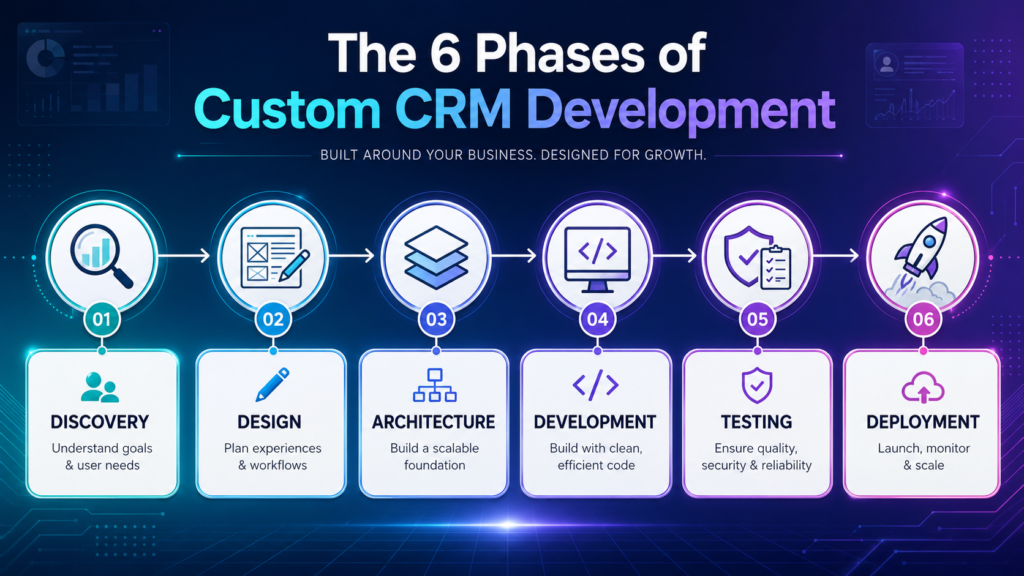
Phase 1: Discovery and Requirement Analysis
This is where you define business goals, workflows, user roles, integrations, and success metrics.
Deliverables:
- CRM requirement document
- User roles
- Workflow map
- Feature list
- Budget estimate
- Timeline estimate
Phase 2: UI/UX Design
The design phase turns workflows into screens.
Deliverables:
- Wireframes
- Dashboard design
- Contact profile layout
- Pipeline view
- Mobile layout
- User journey flow
Phase 3: Architecture and Database Planning
This phase defines the technical foundation.
Deliverables:
- Database schema
- API structure
- Cloud architecture
- Security plan
- Integration plan
- AI model integration approach
Phase 4: Development
Developers build the CRM modules.
Common modules:
- Contact management
- Lead management
- Deal pipeline
- Task management
- Reporting
- Notifications
- User permissions
- Integrations
- AI features
Phase 5: Testing and Quality Assurance
Testing is critical because CRM data affects sales and customer communication.
Test for:
- Bugs
- Security issues
- Permission errors
- Data accuracy
- Automation logic
- Mobile responsiveness
- API failures
- AI output quality
Phase 6: Deployment, Training, and Maintenance
After launch, train the team and monitor adoption.
Ongoing work includes:
- Bug fixes
- Feature improvements
- Security updates
- Performance monitoring
- AI prompt tuning
- Data cleanup
- User feedback cycles
Cost to Build Custom CRM Software
The cost to build custom CRM software depends on complexity, features, integrations, design, team location, development approach, and AI requirements.
A generic price range is not reliable without a written scope. Estimate the three-year total cost of ownership instead of copying a headline development figure.
| Cost area | Ready-made CRM calculation | Custom CRM calculation |
|---|---|---|
| Access | Paid seats × monthly rate × 36 months | Discovery, design and initial build quote |
| Setup | Onboarding, configuration and migration | Architecture, migration and integration work |
| AI and automation | Credits, add-ons, usage limits and premium tiers | Model/API usage, evaluation, monitoring and fallback logic |
| Operations | Internal admin time, training and support plan | Hosting, observability, security updates and support staffing |
| Change | Consultant fees and paid customizations | Maintenance reserve and future feature development |
| Risk allowance | Contract changes, unused seats and lock-in | Contingency for scope change, delays and rework |
What Increases CRM Development Cost?
Cost increases when you add:
- Mobile apps
- AI lead scoring
- AI chatbot
- Call transcription
- Advanced analytics
- ERP integration
- Multi-branch support
- Complex permissions
- Audit logs
- Custom reporting
- Third-party APIs
- Enterprise security
- Data migration
Hidden Costs to Consider
Do not calculate only the initial development cost.
Also consider:
- Cloud hosting
- Maintenance
- Bug fixes
- Security updates
- AI API usage
- Data storage
- Email/SMS costs
- Developer support
- User training
- Future feature development
How Long Does It Take to Build a CRM?
A credible timeline requires a scoped feature list, integration inventory, migration sample, security requirements, acceptance criteria, team capacity, and release plan. A narrow CRM MVP may take weeks or months; complex migrations, mobile apps, regulated data, custom analytics, and AI evaluation can extend delivery substantially.
Ask for milestone estimates for discovery, prototype, migration rehearsal, integration testing, user acceptance, security review, training, and production rollout. Treat a single fixed timeline given before discovery as a warning sign.
Timeline depends on:
- Number of modules
- Design complexity
- Integrations
- AI features
- Data migration
- Testing requirements
- Team size
- Approval speed
If you want to launch faster, build an MVP first. Start with contacts, leads, pipeline, tasks, and reporting. Add AI and advanced automation later.
How to Choose a Custom CRM Development Company
Choosing the right CRM development company is important because a CRM touches sales, customer service, operations, and revenue.
Look for a company that understands both software and business workflows.
What to Check
Before hiring a CRM development company, review:
- CRM development portfolio
- Industry experience
- UI/UX quality
- Security practices
- Integration experience
- AI development capability
- Post-launch support
- Communication process
- Pricing transparency
- Maintenance terms
Questions to Ask
Ask these questions before signing a contract:
- Have you built CRM software before?
- Can you integrate with our current tools?
- How will you handle data migration?
- What security measures will be included?
- Can we start with an MVP?
- How do you estimate cost?
- Who owns the source code?
- What happens after launch?
- How will AI features be tested?
- Can the CRM scale as our team grows?
Red Flags
Avoid companies that:
- Promise a full enterprise CRM in a few weeks
- Do not ask detailed workflow questions
- Cannot explain security clearly
- Push unnecessary AI features
- Avoid documentation
- Do not offer maintenance
- Cannot show relevant case studies
How to Evaluate a Custom CRM Development Partner
Use the same written scope for every vendor. Require named deliverables, acceptance criteria, data-migration ownership, security responsibilities, source-code and intellectual-property terms, support response times, and an exit plan. Ask for references from projects with similar integrations and data sensitivity.
- Run a paid discovery phase before committing to a full build.
- Require a migration rehearsal using a representative data sample.
- Define who approves AI-generated emails, scores, summaries, and recommendations.
- Document model providers, retention settings, logs, failure handling, and manual fallback.
- Confirm ownership and exportability of customer data, configuration, documentation, and source code.
Market-Ready CRM or Custom CRM: Final Decision Framework
Use this simple framework.
Choose HubSpot If:
You need an easy CRM with strong marketing, sales, service, and AI features.
Choose Pipedrive If:
You need a simple, sales-focused CRM with strong pipeline management.
Choose Salesforce If:
You need enterprise-level customization, AI agents, governance, and scalability.
Choose Zoho CRM If:
You want affordable CRM software with a broad business app ecosystem and strong customization.
Choose Freshsales If:
You want a modern sales CRM with AI features, communication tools, and a simple interface.
Choose Custom CRM If:
Your business process is unique, your integrations are complex, or your team has outgrown standard CRM tools.
Final Verdict: What Is the Best AI-Powered CRM System in 2026?
There is no single best CRM for every business.
For most startups and small businesses, HubSpot and Pipedrive are the easiest options to compare. HubSpot is better for inbound marketing and customer journey automation. Pipedrive is better for clean sales pipeline execution.
Checkout about Best AI Tools for Business Automation in 2026!
For budget-conscious teams, Zoho CRM offers strong value. For sales teams that want built-in engagement tools, Freshsales is worth considering. For enterprises, Salesforce remains one of the most powerful choices, especially when AI agents, governance, and deep customization are required.
Custom CRM software becomes worth the investment when your business workflows are too specific for market-ready tools, or when your CRM needs to become a competitive advantage instead of just another subscription.
The smartest approach is simple: start with your process, then choose the CRM. Do not choose a CRM first and force your business to fit inside it.
FAQ
How to create a CRM?
To create a CRM, start by defining your business goal, mapping your customer journey, listing required features, designing the database, building core modules, adding automation, testing with real users, and improving the system after launch. For most businesses, it is better to start with a simple MVP before adding advanced AI features.
How to make a CRM?
To make a CRM, you need contact management, lead tracking, deal pipelines, task management, user roles, reports, and integrations. If you are building a custom CRM, you also need a database, backend, frontend, authentication, security, and testing process.
How to use AI to optimize your CRM?
You can use AI to optimize your CRM by adding lead scoring, email summaries, follow-up suggestions, CRM chatbots, customer sentiment analysis, sales forecasting, duplicate detection, and natural language search. The best use of AI is to reduce manual work and help teams act faster on customer data.
How much does it cost to build CRM software?
There is no dependable universal price. Build a written scope and compare vendor estimates using the same requirements. Include discovery, design, engineering, migration, integrations, security, infrastructure, AI usage, testing, training, support, maintenance, contingency, and the cost of internal staff time.
How long does it take to build a CRM?
A basic CRM may take 3 to 4 months. A mid-level CRM can take 4 to 8 months. A complex AI-powered CRM may take 8 to 12 months or longer. The timeline depends on features, integrations, design complexity, team size, and testing requirements.
How to build CRM software from scratch?
To build CRM software from scratch, define requirements, design workflows, create the database structure, build user management, develop contact and lead modules, create pipeline tracking, add reports, integrate communication tools, test the CRM, deploy it, and train users. AI features should be added after the core CRM is stable.
Official pricing sources and update note
- HubSpot Sales Hub pricing and AI-credit information
- Pipedrive plans, trial and add-ons
- Salesforce Sales Cloud and Agentforce pricing
- Zoho CRM editions and AI availability
- Freshsales plans and Freddy AI add-ons
Testing disclosure: this is a structured, documentation-based comparison rather than a complete hands-on benchmark. Prices, promotions, currencies, taxes, contracts, credits and plan eligibility vary. Verify a written quote for your region and requirements. Last fact-checked: August 10, 2026.
Download the AI Ad Poster Prompt Pack
Want a faster way to create ad-poster concepts with AI? Get the prompt pack, adapt the instructions to your product or campaign, and review every generated claim, image, and brand detail before publishing.
About The Author




Спасибо! Рекомендую Van Gogh Free AI Video Generator (). Van Gogh Free AI Video Generator
okay, thank you!
Really helpful post. If you create marketing clips, check out Pixwit at . Pixwit
Thank you for sharing Pixwit. I will give it a try.