June 3, 2026

How to Use AI to Automate Business Tasks and Save 10+ Hours Weekly?

How to use AI to automate business tasks and save time weekly

AI automation helps businesses save time by handling repetitive workflows across support, finance, sales, and operations.

Most business owners do not lose time because they are lazy. They lose time because too many small tasks keep repeating every day.

Replying to the same customer questions.
Creating invoices manually.
Updating spreadsheets.
Following up with leads.
Copying data from emails into a CRM.
Checking payments.
Writing meeting summaries.
Preparing reports.

Individually, these tasks look small. But together, they can easily waste 10, 15, or even 20 hours every week.

This is where AI business automation becomes useful. Instead of using AI only for writing content or asking random questions, businesses can now use it to automate real workflows. The goal is not to replace people. The goal is to remove repetitive work so your team can focus on sales, customers, strategy, and growth.

In this guide, you will learn how to use AI to automate business tasks, which tasks are worth automating first, which tools to consider, and how to build a simple automation system without making your business messy.


Table of Contents

What Does It Mean to Automate Business Tasks With AI?

To automate business tasks with AI means using artificial intelligence tools to handle repetitive, rule-based, or data-heavy work with minimal manual effort.

Traditional automation follows fixed rules. For example:

“When a form is submitted, send an email.”

AI automation goes one step further. It can understand text, summarize information, classify messages, generate responses, extract data, and make suggestions.

For example:

  • AI can read a customer email and identify whether it is a complaint, refund request, sales inquiry, or support question.
  • AI can summarize a meeting and create follow-up tasks.
  • AI can draft invoice reminders based on payment status.
  • AI can analyze customer feedback and find common issues.
  • AI can help create reports from messy business data.

In simple words, business process automation handles the steps, while AI helps understand the information inside those steps.

Business owner using AI to automate business tasks on a laptop
AI automation helps businesses reduce repetitive work and manage daily operations faster.

Why AI Business Automation Matters in 2026

AI is no longer only a tool for big companies. Small businesses, agencies, freelancers, consultants, eCommerce stores, salons, clinics, travel agencies, and service providers can now use AI tools for business automation without hiring a large technical team.

The biggest advantage is time.

If you save two hours per day from repetitive tasks, that becomes around 10 hours per week. Over a month, that is 40+ hours. That is almost one full workweek recovered every month.

AI workflow automation can also improve:

  • Response speed
  • Customer experience
  • Internal communication
  • Lead follow-up
  • Invoice tracking
  • Bookkeeping accuracy
  • Task visibility
  • Reporting
  • Team productivity

But there is one important point: automation only works well when your process is clear. If your business process is already confusing, AI will not magically fix it. It may only make the confusion faster.

Before using any tool, you need to know what should happen, who is responsible, and what result you expect.

Business Tasks You Should Automate First

Not every task should be automated immediately. The best tasks for AI automation are repetitive, time-consuming, and easy to define.

Start with tasks that happen every day or every week.

1. Customer Support Questions

If customers keep asking the same questions, AI can help answer them faster.

Examples:

  • What are your prices?
  • What are your business hours?
  • How can I book an appointment?
  • Where is my order?
  • What documents are required?
  • How long does the process take?

A small business can use an AI chatbot, WhatsApp assistant, website chat assistant, or AI email response system to answer common questions.

This is especially useful for:

  • Travel agencies
  • Real estate businesses
  • Online stores
  • Clinics
  • Salons
  • Coaching businesses
  • SaaS companies
  • Local service providers

Instead of manually replying to every basic question, AI can handle the first response and collect useful customer details.

Real Use Case

A travel consultancy receives 40 messages per day asking about visa requirements, appointment booking, and document lists. Instead of replying manually every time, the business can create an AI assistant that answers common questions, collects the customer’s name, destination, travel date, and phone number, then sends qualified leads to the sales team.

2. Invoice Automation

Invoice automation is one of the easiest ways to save time.

If you still create invoices manually, send payment reminders yourself, or track paid and unpaid invoices in a spreadsheet, AI and automation tools can help.

You can automate:

  • Invoice creation
  • Payment reminders
  • Due date alerts
  • Recurring invoices
  • Client payment status updates
  • Monthly revenue summaries
  • Late payment follow-ups

For example, when a deal is marked as completed in your CRM, an automation can create an invoice, send it to the client, update your bookkeeping software, and remind the client if payment is late.

This is a practical example of how to automate invoices with AI and workflow tools.

Example Workflow

Client approves project

CRM status changes to “Won”

Invoice is created automatically

Client receives invoice by email

Payment reminder is scheduled

Bookkeeping record is updated

Monthly report is generated

This type of workflow can save hours every month, especially for agencies, freelancers, consultants, and service businesses.

3. Bookkeeping Automation

Bookkeeping is necessary, but it can become a major time drain.

AI-powered bookkeeping automation can help organize expenses, categorize transactions, detect unusual entries, prepare summaries, and reduce manual data entry.

You can automate:

  • Expense categorization
  • Receipt processing
  • Transaction matching
  • Monthly bookkeeping reports
  • Tax document preparation
  • Cash flow summaries
  • Profit and loss snapshots

This does not mean you should remove your accountant. Instead, AI can prepare cleaner data so your accountant or finance manager spends less time fixing basic mistakes.

Real Use Case

A small marketing agency pays for software tools, contractors, ads, subscriptions, and office expenses. Every month, the owner spends hours checking receipts and updating sheets. With bookkeeping automation, receipts can be uploaded automatically, expenses can be categorized, and monthly summaries can be prepared for review.

This is a strong example of how to automate bookkeeping with AI while still keeping human approval for important financial decisions.

4. Email Management and Follow-Ups

Email is one of the biggest hidden productivity killers.

AI can help with:

  • Sorting emails by priority
  • Drafting replies
  • Summarizing long email threads
  • Creating follow-up reminders
  • Extracting action items
  • Sending lead follow-ups
  • Handling appointment confirmations

For example, if a potential client fills out a contact form, an AI workflow can send a personalized reply, notify your sales team, create a CRM record, and schedule a follow-up after two days.

This is where AI workflows become powerful. You are not just writing emails faster. You are building a system that makes sure leads do not get ignored.

Example Workflow

Website form submitted

AI reads the message

Lead is categorized by service type

Personalized reply is drafted

Lead is added to CRM

Sales task is created

Follow-up reminder is scheduled

This is useful for businesses where missed follow-ups can directly cost money.

5. Social Media and Content Scheduling

AI can also automate parts of your marketing workflow.

This does not mean you should publish low-quality AI content everywhere. Instead, use AI to speed up the planning, drafting, repurposing, and scheduling process.

AI can help with:

  • Social media post ideas
  • Caption drafts
  • Blog outlines
  • Email newsletter drafts
  • Content repurposing
  • Hashtag suggestions
  • Content calendar planning
  • Video script summaries
  • LinkedIn post drafts

For example, one blog post can become:

  • 5 LinkedIn posts
  • 3 Facebook posts
  • 5 Pinterest pin titles
  • 1 email newsletter
  • 3 short video scripts
  • 10 social captions

This saves time while keeping your marketing consistent.

Practical Tip

Do not publish AI-generated marketing content without editing. Add your examples, opinions, customer stories, product screenshots, and brand voice. This improves trust and makes your content less generic.

6. Meeting Notes and Task Management

Meetings often create work, but many teams forget to turn meeting discussions into clear tasks.

AI can help by:

  • Transcribing meetings
  • Summarizing key points
  • Extracting action items
  • Assigning tasks
  • Creating deadlines
  • Sending follow-up notes
  • Updating project management tools

For example, after a client meeting, AI can generate a summary, list decisions, create tasks, and send a follow-up email.

This is helpful for:

  • Agencies
  • Remote teams
  • Consultants
  • Project managers
  • Sales teams
  • Client service teams

Good task automation reduces confusion because everyone knows what needs to happen next.

7. Sales Lead Management

Sales teams waste a lot of time on manual lead entry and inconsistent follow-ups.

AI business automation can help manage leads from different sources, such as:

  • Website forms
  • Facebook ads
  • Google ads
  • WhatsApp messages
  • Instagram DMs
  • Email inquiries
  • Landing pages
  • Live chat

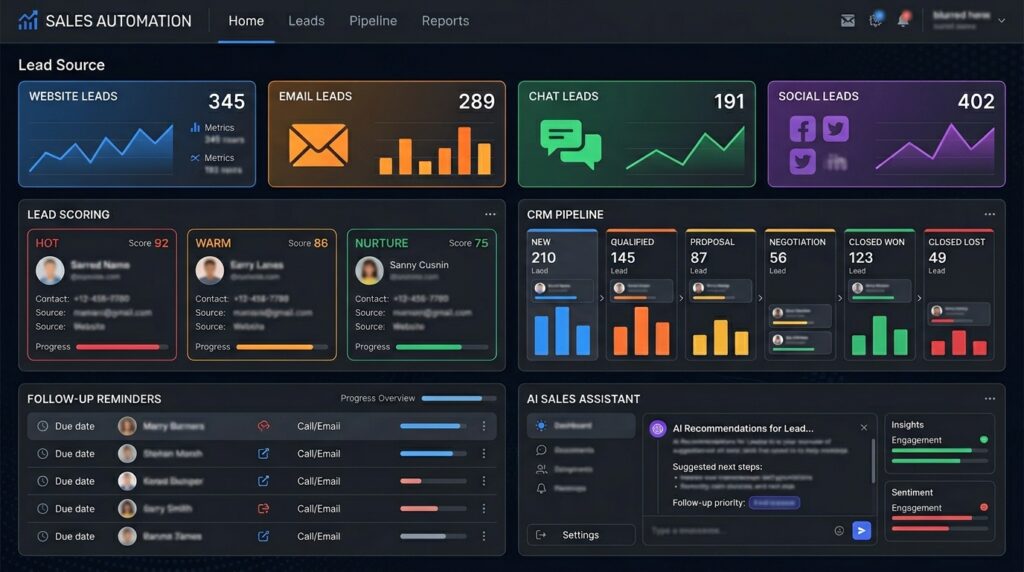
AI can classify leads based on interest, urgency, budget, service type, and location.

Example Workflow

A lead fills out a form

AI checks the message intent

Lead is scored as hot, warm, or cold

CRM record is created

Salesperson receives notification

Follow-up message is drafted

Reminder is created if there is no reply.

AI sales lead management automation dashboardCaption:
AI can help qualify leads, update CRM records, and trigger sales follow-ups.

This kind of small business automation can improve sales without hiring more staff.

Best AI Tools for Business Automation in 2026

There is no single best tool for every business. The right tool depends on your workflow, budget, team size, and existing software.

Here are some common categories.

1. Microsoft Power Automate

Microsoft Power Automate is useful for businesses already using Microsoft 365, Outlook, Excel, SharePoint, Teams, or Dynamics.

It can help automate:

  • Approval workflows
  • Email notifications
  • Excel updates
  • File organization
  • Data collection
  • Repetitive desktop tasks
  • Internal business processes

Power Automate Desktop

Power Automate Desktop is useful when you need desktop automation or robotic process automation. For example, it can help automate repetitive actions across desktop apps, old software, browser tasks, and internal tools.

This is helpful for businesses that still rely on legacy systems.

Best for:

  • Office teams
  • Admin workflows
  • Microsoft-based businesses
  • Repetitive desktop processes
  • Internal approvals

2. Zapier

Zapier is useful for connecting different apps without coding.

You can connect tools like forms, email, CRM, spreadsheets, project management apps, AI tools, and marketing platforms.

Best for:

  • Small businesses
  • Agencies
  • Solopreneurs
  • Marketing teams
  • Simple AI workflow automation
  • App-to-app automation

Example:

When a new lead comes from a website form, Zapier can send the lead to Google Sheets, create a CRM contact, notify your team in Slack, and ask AI to draft a follow-up email.


3. Make

Make is another strong automation platform for visual workflows. It is useful when you want more control over multi-step automations.

Best for:

  • Visual workflow builders
  • Agencies
  • Advanced automations
  • Multi-step business processes
  • Data routing

Example:

A new order comes in. Make can check payment status, update inventory, send a customer email, create a shipping task, and notify the team.


4. ChatGPT or Claude for Business Workflows

AI assistants like ChatGPT or Claude are useful for thinking, writing, summarizing, analyzing, and creating workflow logic.

They can help with:

  • Writing email templates
  • Creating SOPs
  • Summarizing data
  • Drafting reports
  • Creating automation instructions
  • Building customer support scripts
  • Generating content ideas
  • Analyzing customer feedback

However, AI chatbots alone are not full automation systems. To automate business tasks properly, connect them with workflow tools like Zapier, Make, Power Automate, or your CRM.


5. QuickBooks or Accounting Tools With AI Features

For finance-related automation, accounting tools can help with bookkeeping automation, invoice automation, expense tracking, and financial reporting.

Best for:

  • Freelancers
  • Agencies
  • Small businesses
  • Consultants
  • eCommerce businesses
  • Service businesses

Use these tools to reduce manual financial admin, but always review important financial records before final submission.


6. CRM and Marketing Automation Tools

CRM platforms can automate sales, customer communication, and lead tracking.

They can help with:

  • Lead assignment
  • Email sequences
  • Deal tracking
  • Customer follow-ups
  • Sales reports
  • Customer segmentation
  • Support workflows

Best for:

  • Sales teams
  • Service businesses
  • Agencies
  • B2B companies
  • Local businesses with high inquiry volume
Best AI tools for business automation in 2026
Different AI automation tools help businesses manage workflows, finance, sales, and customer support.

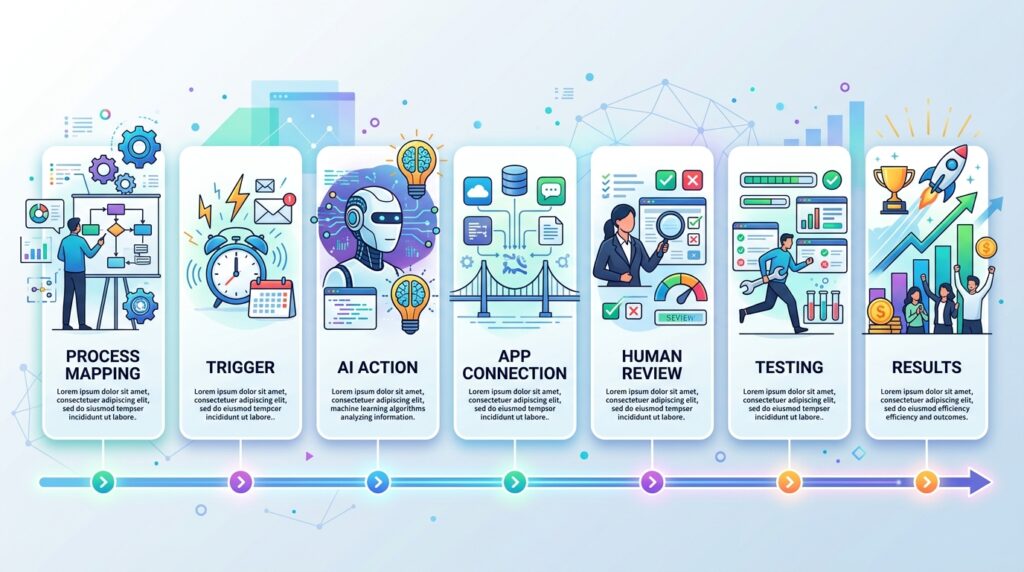
How to Start AI Workflow Automation Step by Step

If you are new to automation, do not start by trying to automate your entire business. Start small.

Step 1: List Your Repetitive Tasks

Write down every task you repeat daily or weekly.

Examples:

  • Replying to customer questions
  • Sending invoices
  • Updating spreadsheets
  • Creating reports
  • Following up with leads
  • Scheduling appointments
  • Copying data between apps
  • Checking payment status
  • Sending reminders

Then estimate how much time each task takes per week.

Step 2: Choose One High-Impact Workflow

Pick one workflow that is repetitive and has a clear result.

Good first automation examples:

  • Lead capture and follow-up
  • Invoice reminders
  • Customer FAQ replies
  • Meeting summary to task list
  • Weekly report generation
  • Social media content scheduling
  • Bookkeeping categorization

Avoid starting with a complicated workflow that affects many departments.

Step 3: Map the Process

Before using any tool, map the workflow.

Ask:

  • What starts the process?
  • What information is needed?
  • What should AI do?
  • What should a human review?
  • What tool should receive the output?
  • What should happen if something fails?

Example:

Trigger: New website inquiry
AI action: Read inquiry and identify service type
Automation action: Add lead to CRM
Human action: Salesperson reviews and calls lead
Final result: Lead is followed up within 10 minutes

Step 4: Choose the Right Tool

Choose the tool based on your existing setup.

Use:

  • Power Automate if your business uses Microsoft tools
  • Zapier if you want easy app connections
  • Make if you need visual multi-step workflows
  • QuickBooks or accounting software for finance workflows
  • CRM automation for sales and customer management
  • ChatGPT or Claude for writing, summarizing, and analysis tasks

Step 5: Add Human Review

Do not fully automate sensitive decisions in the beginning.

Keep human approval for:

  • Payments
  • Refunds
  • Legal responses
  • Financial reports
  • Customer complaints
  • Hiring decisions
  • Contract changes
  • High-value sales proposals

AI should assist, not blindly control important business decisions.

Step 6: Test the Automation

Test the workflow with real examples.

Check:

  • Did the right trigger start the workflow?
  • Did AI understand the message correctly?
  • Was the output useful?
  • Did the data go to the correct tool?
  • Were notifications sent properly?
  • What happens if information is missing?
  • Can a human override the result?

Run at least 10 to 20 test cases before depending on the automation.

Step 7: Measure Time Saved

Track time saved before and after automation.

Measure:

  • Hours saved per week
  • Response time improvement
  • Fewer missed follow-ups
  • Fewer manual errors
  • Faster invoice collection
  • Better customer experience
  • Better team visibility

This is how you prove whether your automation is actually useful.


Step by step AI workflow automation process for businesses
Start AI automation with one clear workflow, test it, and measure the time saved.

Example: How AI Can Save 10+ Hours Weekly

Here is a realistic example for a small service business.

Before AI Automation

Weekly manual work:

  • Replying to customer FAQs: 3 hours
  • Creating invoices: 2 hours
  • Sending payment reminders: 1 hour
  • Updating lead spreadsheet: 1.5 hours
  • Writing follow-up emails: 1.5 hours
  • Preparing weekly report: 2 hours

Total: 11 hours per week

After AI Automation

Automated workflow:

  • AI chatbot answers common questions
  • Website forms send leads to CRM
  • AI drafts follow-up emails
  • Invoice reminders are sent automatically
  • Bookkeeping software categorizes expenses
  • Weekly report is generated automatically

Manual review still required:

  • Approving financial records
  • Handling complex customer questions
  • Reviewing important sales messages

Estimated time saved: 7 to 12 hours weekly

This is why AI business automation is powerful. You do not need one huge automation. You need several small automations that remove repetitive work.

Common Mistakes to Avoid With AI Automation

AI automation can save time, but only if implemented carefully.

Mistake 1: Automating a Broken Process

If your process is unclear, automation will make the problem worse.

Fix the process first. Then automate it.

Mistake 2: Removing Human Review Too Early

Do not let AI handle sensitive business decisions without approval.

Use human review for finance, legal, refunds, complaints, and high-value customer communication.

Mistake 3: Using Too Many Tools

More tools do not always mean better automation.

Start with your existing tools and add only what you need.

Mistake 4: Ignoring Data Privacy

Do not put confidential customer, financial, or legal information into random AI tools without checking privacy, permissions, and data policies.

Mistake 5: Not Measuring Results

If you do not measure time saved, you will not know whether the automation is worth it.

Track before and after performance.

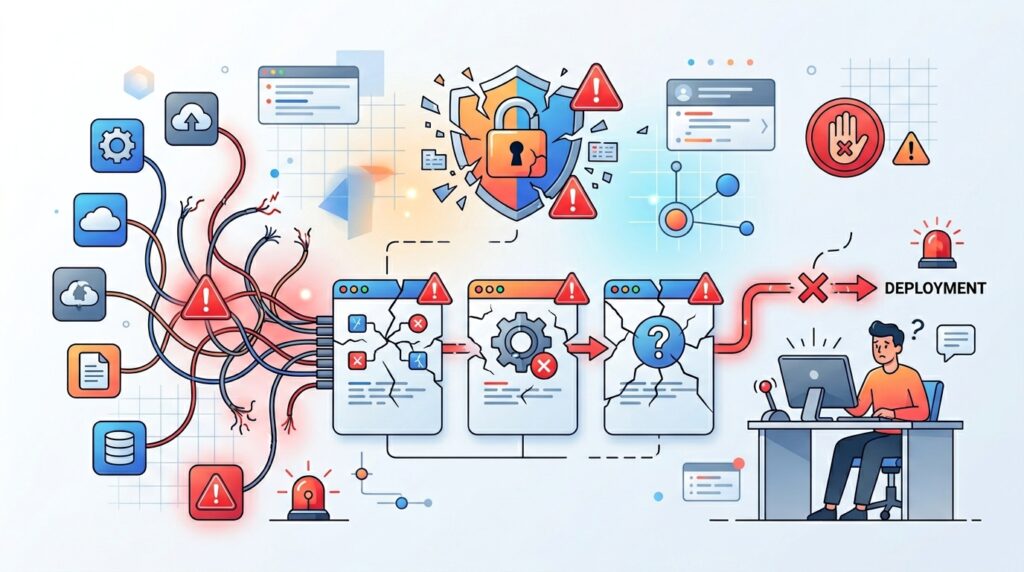
Common AI automation mistakes businesses should avoid
AI automation works best when processes are clear, secure, and reviewed by humans.

Best Business Tasks to Automate by Department

Here is a simple breakdown.

Sales

Automate:

  • Lead capture
  • Lead scoring
  • Follow-up emails
  • CRM updates
  • Proposal reminders
  • Call summaries

Marketing

Automate:

  • Content ideas
  • Social media scheduling
  • Email newsletters
  • Blog outlines
  • Campaign reports
  • Customer segmentation

Finance

Automate:

  • Invoice creation
  • Payment reminders
  • Expense categorization
  • Receipt processing
  • Monthly summaries
  • Bookkeeping reports

Operations

Automate:

  • Task assignment
  • Approval workflows
  • Document routing
  • Internal notifications
  • Weekly reports
  • SOP creation

Customer Support

Automate:

  • FAQ replies
  • Ticket classification
  • Complaint routing
  • Customer feedback summaries
  • Order status replies
  • Appointment confirmations
AI automation tasks by business department
AI automation can support sales, marketing, finance, operations, and customer service workflows.

AI Automation Checklist for Small Businesses

Use this checklist before launching your first automation.

  • Choose one repetitive task
  • Write down the exact process
  • Define the trigger
  • Define the output
  • Choose the right automation tool
  • Add AI only where intelligence is needed
  • Keep human approval for sensitive tasks
  • Test with real examples
  • Track time saved
  • Improve the workflow every month

This checklist keeps your automation practical and safe.

AI automation checklist for small businesses
A simple checklist helps small businesses launch AI automation safely.

FAQs

What is the best way to use AI to automate business tasks?

The best way is to start with one repetitive workflow, such as customer replies, invoice reminders, lead follow-ups, or weekly reports. Map the process first, choose the right tool, add AI where it helps, and keep human review for important decisions.

Can AI automate invoices?

Yes, AI and automation tools can help create invoices, send payment reminders, track payment status, and update bookkeeping records. This is useful for freelancers, agencies, consultants, and small businesses that handle recurring billing.

Can AI automate bookkeeping?

AI can help automate bookkeeping tasks such as expense categorization, receipt processing, transaction matching, and monthly financial summaries. However, important financial records should still be reviewed by a human or accountant.

What are the best AI tools for business automation?

Common tools include Microsoft Power Automate, Power Automate Desktop, Zapier, Make, QuickBooks, CRM automation tools, and AI assistants like ChatGPT or Claude. The best tool depends on your business workflow and existing software.

Is Microsoft Power Automate good for small businesses?

Microsoft Power Automate can be useful for small businesses that already use Microsoft 365, Outlook, Excel, SharePoint, Teams, or Dynamics. It is especially helpful for approval workflows, internal processes, and repetitive desktop tasks.

What is Power Automate Desktop used for?

Power Automate Desktop is used for desktop automation and robotic process automation. It can help automate repetitive tasks across desktop apps, websites, and older business software.

Conclusion

Learning how to use AI to automate business tasks is one of the most practical ways to save time in 2026.

You do not need to automate everything at once. Start with one repetitive workflow. Customer support, invoice automation, bookkeeping automation, lead follow-ups, meeting notes, and weekly reports are all strong starting points.

The real value of AI automation is not only speed. It is consistency. Leads get followed up. Invoices get sent. Reports get prepared. Customers get faster replies. Teams know what to do next.

If you want to save 10+ hours weekly, do not chase every new AI tool. Build simple AI workflows around your real business processes. Start small, test carefully, keep human review where needed, and improve your system over time.

That is how AI business automation becomes a real productivity advantage instead of just another trend.

About The Author

Leave a Reply

Your email address will not be published. Required fields are marked *