
How to Use Notion AI for Writing and Content Organization

Content work gets messy fast.
You start with one blog idea. Then come keyword notes, competitor links, YouTube angles, social captions, screenshots, internal links, draft versions, and publishing deadlines. By the time you open WordPress, half of the work is scattered across Google Docs, Slack messages, sticky notes, and browser tabs.
That is where Notion AI changes things.
Notion AI is not just a writing assistant. Used properly, it becomes a full content workspace where you plan ideas, create outlines, summarize research, turn meeting notes into action items, organize drafts, and reuse templates instead of starting from zero every time.
In this guide, you will learn exactly how to use Notion AI to write and organize content faster with real prompts, workflow examples, and practical setups that actually work.
What Does Notion AI Do?
Notion AI is an AI assistant built directly inside the Notion workspace. Unlike standalone AI tools, you use it inside your notes, pages, databases, wikis, and content calendars, where your actual work already lives.
Notion AI can help content creators with:
- Brainstorming blog post ideas with search intent in mind
- Turning rough notes into structured outlines
- Summarizing long research pages into key points
- Creating section-by-section first drafts
- Rewriting paragraphs for clarity or tone
- Generating meeting summaries and action items
- Extracting ideas from transcripts and interviews
- Organizing content ideas into topical clusters
- Building and filling content calendars
- Repurposing one article into social posts, emails, and scripts
- Searching across your entire Notion workspace knowledge base
The core advantage is context. If your content plan, brand notes, keyword list, and drafts already live in Notion, Notion AI works inside that system instead of forcing you to copy-paste between tools.
Related: Best AI Tools for Content Creators — Tested and Ranked
Is Notion AI a Writing Tool or a Content Organization Tool?
It is both, but its real strength is organization.
Most AI writing tools can generate paragraphs. The problem is that content teams do not only need text. They need a system.
A complete content workflow includes:
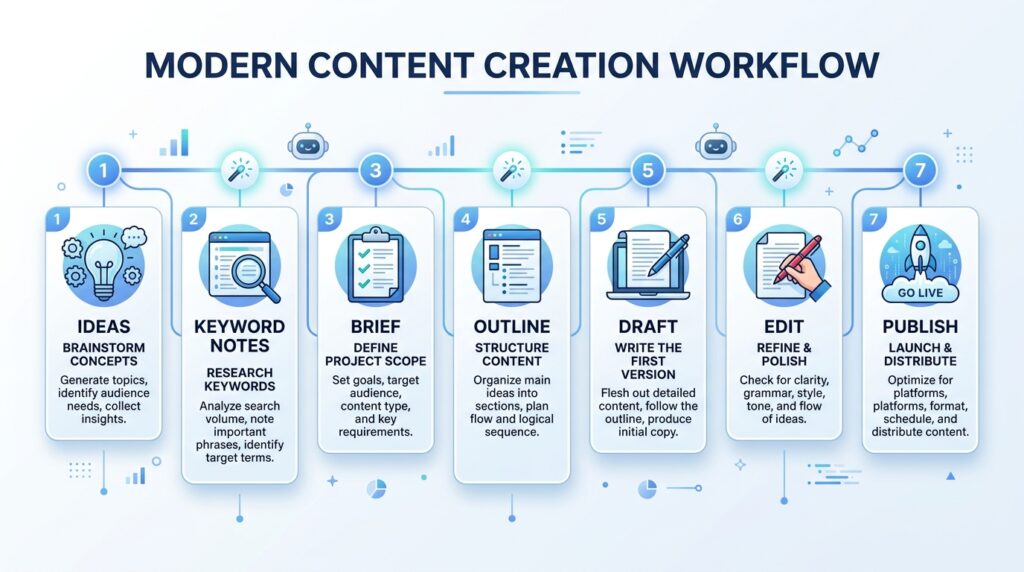
- Idea capture
- Keyword research
- Content brief
- Outline
- Draft
- Editing
- Internal linking
- Image planning
- Publishing
- Updating old content
Notion AI helps most when you use it across the full process, not just for writing paragraphs.
For example, instead of the weak prompt:
“Write a blog post about AI tools.”
A stronger Notion AI workflow looks like:
“Review these 20 content ideas and group them into 5 topic clusters. For each cluster, suggest one pillar blog post, one YouTube video angle, and three social media post ideas.”
That is how you move from a random list of ideas to a content system.
Related: Best AI Productivity Tools for Bloggers and Creators
How to Use Notion AI for Content Creation
Step 1: Build a Content Dashboard First
Before using Notion AI to write anything, create a structured content dashboard. This is what makes Notion AI significantly more useful than a standalone chatbot, it has a workspace context to work with.
Your dashboard should include:
- Blog ideas database
- Keyword research notes
- Content briefs
- Article drafts
- Published articles tracker
- Update schedule
- Social media repurposing queue
- Internal link opportunities list
Recommended database properties:
| Property | Example Value |
|---|---|
| Title | How to Use Notion AI |
| Content Type | Blog Post |
| Status | Idea / Brief / Draft / Editing / Published |
| Focus Keyword | how to use Notion AI |
| Search Intent | Informational / Tutorial |
| Target Audience | Bloggers, creators, marketers |
| Priority | High / Medium / Low |
| Publish Date | June 2026 |
| Internal Links | AI writing tools, AI productivity tools |
| Notes | Add workflow examples, screenshots |
Once this structure exists, Notion AI has something to work with — and that is when it becomes genuinely useful.
Step 2: Brainstorm Content Ideas With Clear Search Intent
Most people waste AI brainstorming by asking vague questions and getting generic output no one will search for.
The fix: give Notion AI a clear angle, audience, and intent before asking for ideas.
Strong brainstorming prompt:
“I run an AI tools website targeting bloggers, students, creators, and small businesses. Generate 20 blog post ideas around Notion AI. Separate them by search intent: beginner tutorials, tool comparisons, use case guides, and buying-decision articles. Avoid generic titles. Include the primary keyword for each idea.”
Sample output this generates:
- How to Use Notion AI for Blog Planning (tutorial)
- Notion AI vs ChatGPT for Content Writers (comparison)
- Is Notion AI Worth It for Small Teams? (buying-intent)
- How to Use Notion Templates for a Content Calendar (tutorial)
- Best Notion AI Prompts for Content Creators (commercial)
- How to Turn Meeting Notes into Blog Posts with Notion AI (use case)
This gives you articles with different intents instead of one flat, unusable list.
Step 3: Organize Ideas into Topic Clusters
Publishing random tool reviews is one of the fastest ways to stall SEO growth. The better approach: organize content into topical clusters.
Example Notion AI cluster:
Pillar Article: How to Use Notion AI to Write & Organize Content Faster (this article)
Supporting Articles:
- Notion AI vs ChatGPT: Which Is Better for Writers?
- AI Productivity Tools for Content Workflows
- Build a Content Calendar in Notion
- How to Use Notion AI for Meeting Notes
- Is Notion AI Worth It? Pricing, Features, and Real Use Cases
Prompt to organize your ideas:
“Group these content ideas into topic clusters. For each cluster, choose one pillar article, four supporting articles, and suggest the best internal linking structure between them.”
This builds topical authority instead of scattered articles that compete against each other.
How to Use Notion AI to Write Blog Posts Faster
1. Always Start With a Human-Written Content Brief
Do not let AI start from a blank page. The quality of what Notion AI produces is directly tied to the quality of context you give it first.
A strong content brief includes:
- Target keyword and secondary keywords
- Reader problem being solved
- Search intent (informational, commercial, tutorial)
- Target audience description
- Competitors to outperform
- Unique angle or perspective
- Required sections
- Real examples to include
- Internal links to add
- Call to action
Example brief for this article:
Target keyword: how to use Notion AI
Audience: bloggers, content creators, small business owners
Intent: tutorial + evaluation
Angle: Notion AI is most powerful as a content operating system, not just a paragraph generator
Must answer: what does Notion AI do, is Notion AI worth it, how to use Notion templates
Include: content calendar setup, meeting notes workflow, WordPress publishing process, social repurposing
Internal links: AI writing tools, AI productivity tools, AI tools for business automation
Then prompt Notion AI:
“Turn this brief into a detailed SEO outline. Use clear H2 and H3 headings. Keep the tone practical and direct. Avoid generic AI filler phrases.”
2. Generate the Outline First — Not the Full Article
A full AI draft usually lands flat because the model tries to cover everything at once with no real direction. The result sounds polished but says nothing specific.
Start with the outline instead.
Outline prompt:
“Create a detailed blog outline for this brief. Include H2 and H3 headings, practical examples in each section, step-by-step instructions, a common mistakes section, FAQs based on search intent, and a conclusion. Make sure beginner questions are answered clearly.”
Then review the outline manually.
Delete weak sections. Add your own examples. Reorder if needed. Fix the logic. Only then move to drafting.
This step alone improves the final article significantly.
3. Draft One Section at a Time
Asking Notion AI to write a full article in one shot produces average output. Drafting section by section gives you far more control.
Section draft prompt:
“Write the section titled ‘How to Use Notion AI for Content Creation.’ Keep it practical. Use short paragraphs. Include one real workflow example. Avoid overused openings like ‘In today’s digital world’ or ‘In this section, we will explore.'”
Then immediately edit with:
“Rewrite this section in a more natural tone. Make it sound like advice from someone who has used Notion for content planning for over a year.”
This is important. AI-generated content often becomes too polished-sounding, too broad, or too repetitive without this step.
4. Use Notion AI as an Editor, Not Just a Writer
This is where most people miss the biggest value. Notion AI is often more useful for editing than for writing.
Use it to:
- Shorten long paragraphs without losing meaning
- Improve clarity in technical sections
- Remove repeated points
- Rewrite weak introductions
- Create smoother transitions between sections
- Convert dense notes into scannable bullet points
- Convert bullet points back into readable paragraphs
- Simplify jargon for a broader audience
Editing prompts that actually work:
“Make this paragraph clearer without changing the meaning.”
“Remove repetition from this section and keep only the strongest points.”
“Rewrite this introduction so it opens with the reader’s specific problem, not a general claim.”
“Check this article for questions a first-time Notion user would still have after reading it.”
“List every sentence in this draft that sounds like generic AI output and suggest a more specific replacement.”
This process keeps your article original because you are directing the content, not accepting whatever the model produces.
How to Use Notion Templates for Faster Content Workflows
A Notion template is a reusable page or database setup. Templates eliminate the repetitive structure-building that wastes time at the start of every new project.
For content creation, templates can cover:
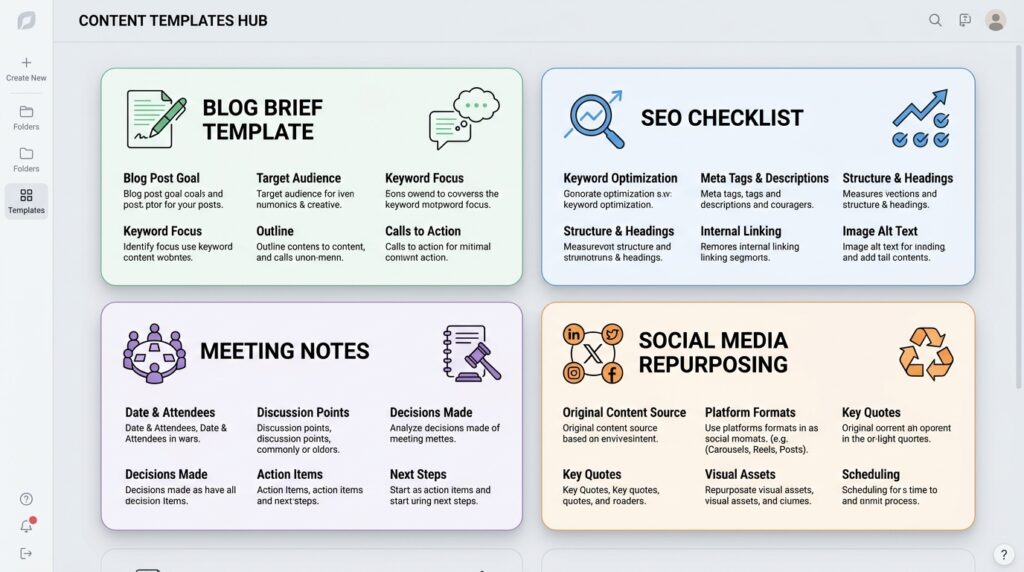
- Blog post briefs
- SEO publishing checklists
- YouTube script planners
- Social media content calendars
- Newsletter drafts
- Meeting notes
- Content update logs
- Client content dashboards
Template 1: SEO Blog Post Template
Create a database called Content Calendar.
Inside it, add a template called SEO Blog Post.
Template structure:
# Blog Post Brief

Focus Keyword:
Secondary Keywords:
Search Intent:
Reader Problem:
Unique Angle:
Competitors to Beat:
Internal Links:
External Sources:
Image Ideas:
CTA:

## Outline

## Draft

## SEO Publishing Checklist

- [ ] Title includes focus keyword
- [ ] Meta description written (under 155 characters)
- [ ] URL slug added
- [ ] H2s answer real search questions
- [ ] FAQs included and schema-ready
- [ ] Internal links added (minimum 3)
- [ ] External links to authoritative sources added
- [ ] Images compressed and named with keywords
- [ ] Alt text written for every image
- [ ] Article reviewed and edited by human before publishing
- [ ] Rank Math / Yoast SEO score checked
Every new blog post starts from this template. No rebuilding from scratch.
Template 2: Social Media Repurposing Template
After publishing a blog post, open this template to extract multi-platform content:
## Repurposing — [Article Title]

Source URL:
Publish Date:

### LinkedIn Post

### X / Twitter Thread

### Instagram Carousel Outline (5-7 slides)

### Pinterest Pin Title + Description

### YouTube Shorts Hook

### Email Newsletter Summary (2-3 sentences)
Prompt to fill it:
“Repurpose this blog post into one LinkedIn post, an Instagram carousel with 6 slides, a Pinterest pin title and description, and three YouTube Shorts hooks. Keep each version platform-specific in tone and length.”
This turns one article into five or six pieces of content in under 10 minutes.
Template 3: Meeting Notes Template
For creators who generate content from team calls, client sessions, or podcast interviews:
## Meeting Notes — [Date]

Meeting Goal:
Attendees:

### Key Discussion Points

### Content Ideas Mentioned

### Decisions Made

### Action Items
- [ ]
- [ ]

### Follow-Up Tasks

### Possible Article or Social Post Angles
Prompt:
“Summarize these meeting notes into key points, decisions, action items, and at least three content ideas I can develop into articles or social posts.”
How to Use Notion AI Meeting Notes for Content Creation
Before recording: Notion currently labels AI Meeting Notes as beta and states that access depends on the plan and device. Obtain consent from every participant, confirm who can access the transcript, and test audio capture before an important call. The desktop app can capture system audio and microphone input, while browser and mobile behavior is more limited.
Turn Client Calls into Content Briefs
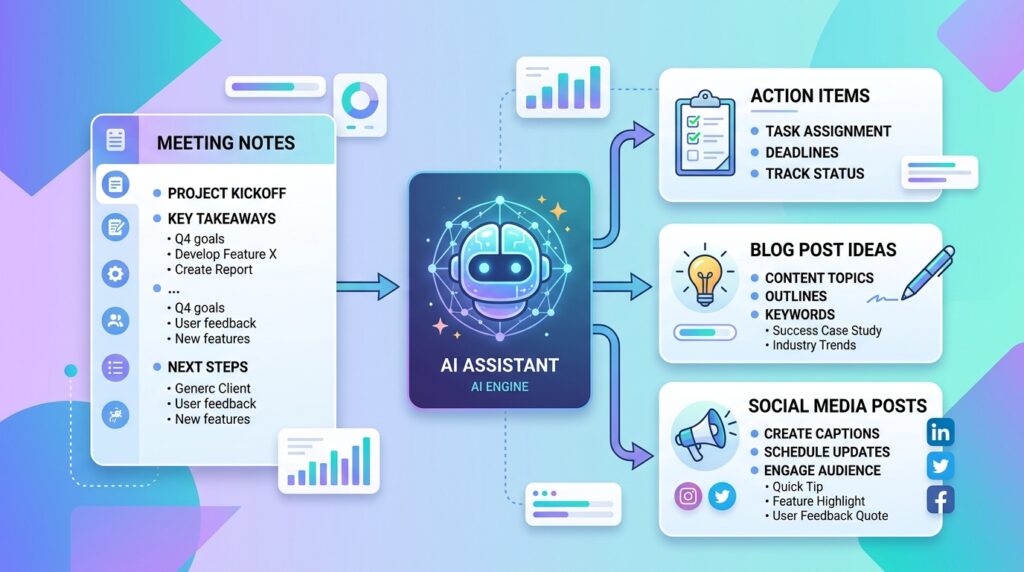
When a client explains their product, audience, or pain points during a discovery call, those details are content gold. Instead of writing briefs from scratch later, capture the notes and prompt:
“Turn these meeting notes into a content brief. Include target audience, core pain points, article angle, suggested headings, and likely FAQ questions.”
Turn Team Meetings into a Content Calendar
After a campaign strategy session, prompt:
“Extract all content ideas from these notes and organize them into a 30-day content calendar with content type, suggested keywords, and priority level.”
Turn Expert Interviews into Article Outlines
After recording a founder interview, podcast, or expert Q&A:
“Turn this interview transcript into an article outline. Keep the expert’s original insights central. Mark where direct quotes should appear and where I should write original commentary.”
This is significantly better than writing from memory two days after the call.
Notion AI for WordPress Content Workflows
Notion AI works best before WordPress, not inside it. Use Notion as your planning and drafting layer and WordPress for publishing.
Clean WordPress workflow using Notion AI:
- Capture ideas in Notion Content Ideas database
- Build content brief from template
- Draft article section by section with Notion AI
- Manually edit, fact-check, and add examples
- Add internal links using your published URLs database
- Create image prompts and write alt text in Notion
- Copy final article into WordPress
- Format H2s, H3s, tables, and images
- Add Rank Math title, meta description, and schema markup
- Publish and add the URL to your Published Articles tracker in Notion
This keeps WordPress clean and turns Notion into a full editorial operating system.
If you run a content site, create a second Notion database for published article URLs with their focus keywords. Every time you write a new article, you can check this database for relevant internal link opportunities before publishing.
Related: Best AI Writing Tools for Blog Posts — Compared and Tested
Notion AI vs ChatGPT: Which Is Better for Content?
These are not the same type of tool. Understanding the difference saves time.
| Use Case | Notion AI | ChatGPT |
|---|---|---|
| Brainstorming inside your notes | ✅ Best choice | ❌ Requires copy-pasting |
| Deep topic research | ❌ Limited | ✅ Best choice |
| Summarizing your Notion pages | ✅ Best choice | ❌ No workspace access |
| Advanced prompt engineering | ❌ Limited | ✅ Best choice |
| Organizing content databases | ✅ Best choice | ❌ No database access |
| Long-form strategy discussions | ❌ Limited | ✅ Best choice |
| Meeting notes → action items | ✅ Best choice | ❌ No workspace access |
| Code generation | ❌ Limited | ✅ Best choice |
| Content calendar management | ✅ Best choice | ❌ No workspace access |
The most effective workflow uses both:
- Use ChatGPT or Claude for deep research, strategy, and complex comparisons
- Use Notion AI to organize, summarize, edit, and manage the content pipeline
Neither tool replaces the other. They cover different parts of the workflow.
Related: ChatGPT vs Claude vs Gemini — Which AI Tool Is Best for Writers?
Is Notion AI Worth It? Pricing and Honest Evaluation
Notion’s plans and AI packaging have changed over time. At the August 10, 2026 fact-check, the official Notion pricing page listed Free, Plus, Business, and Enterprise plans, while access to AI features, retention settings, usage allowances, and credits varied by plan. AI Meeting Notes was documented for Business and Enterprise plans and certain eligible subscriptions. Check the live pricing and feature table before purchasing; do not rely on an older flat add-on price.
Notion AI is worth it if:
- You already use Notion for notes, projects, or content planning
- You manage multiple articles, projects, or clients simultaneously
- You want one tool for writing, organizing, and project management
- You run a content team that needs shared templates and calendars
- You want to turn meeting notes into usable content assets
- You are a blogger, YouTuber, agency, or marketing team
Notion AI is probably not worth it if:
- You do not currently use Notion for anything
- You only need occasional AI writing once a week
- Your workflow is built entirely around Google Docs or another CMS
- You need advanced SEO data inside your writing environment
- You need a dedicated AI writing tool with built-in SEO scoring
The honest verdict:
If Notion is already where your work lives, Notion AI saves real time. If Notion is not part of your workflow yet, learn the workspace first before adding the AI layer.
Complete Notion AI Content Workflow — Step by Step
Here is a complete workflow you can copy today.
Step 1: Capture Raw Ideas
Create a database called Content Ideas. Add every rough idea without filtering.
Examples:
- Notion AI full guide
- AI tools for bloggers
- ChatGPT vs Notion AI comparison
- How to organize YouTube scripts
- AI meeting notes for agencies
Then prompt:
“Clean up these rough ideas and turn each one into an SEO-friendly article title with a clear search intent label.”
Step 2: Group Ideas by Search Intent
“Group these ideas by search intent: informational, comparison, commercial, tutorial, and template-based. Suggest a primary keyword for each.”
A tutorial article should teach a process. A comparison article should help readers choose. A commercial article should help people decide to buy. A template article should give a ready-to-use framework.
Step 3: Build a Content Calendar
“Turn these ideas into a 4-week content calendar. Prioritize beginner-friendly tutorials first, then comparison articles, then buying-intent content. Include content type, suggested keyword, and publishing week for each.”
Step 4: Create a Content Brief
For each article:
“Create a full content brief for this topic. Include focus keyword, search intent, target audience, article outline with H2s and H3s, examples to include, FAQ questions, image ideas, and internal link suggestions.”
Step 5: Draft Section by Section
“Write the section titled [Section Name] in a natural, direct tone. Use short paragraphs, include one practical example, and avoid vague filler statements.”
Step 6: Edit for Human Quality
“Review this draft and identify every line that sounds like generic AI output. List the weak sections and suggest more specific replacements that a real practitioner would write.”
Step 7: Prepare for Publishing
“Create an SEO title, meta description under 155 characters, URL slug, five FAQ questions and answers, alt text suggestions for three images, and three social media post captions for this article.”
Then move the polished draft into WordPress.
Common Mistakes When Using Notion AI
Mistake 1: Asking for a Full Article Too Early
Asking Notion AI to write a complete article before providing context produces generic output every time.
Fix: Create a brief, generate an outline, and draft section by section.
Mistake 2: Not Adding Your Own Experience
AI structures and drafts, but the article needs original examples, tested workflows, screenshots, or opinions that only you have.
Weak: “Notion AI improves content productivity.”
Strong: “In a blog content workflow, Notion AI is most useful after you already have notes, keywords, and a draft structure. It saves the most time converting scattered raw notes into a usable working outline.”
The second version is more citable, more trustworthy, and more useful to AI search engines extracting answers.
Mistake 3: Keyword Stuffing and Outdated Date References
Avoid forcing keywords unnaturally. Avoid embedding specific month and year references like “October 2024 update” inside evergreen content these make articles feel stale the following month.
Use evergreen phrasing unless you are writing a news article or changelog.
Mistake 4: Publishing Without Fact-Checking
Notion AI can draft confidently and incorrectly. Always manually verify:
- Current pricing
- Feature availability and plan limits
- Integration details
- Product changes and version notes
- Anything time-sensitive
This matters especially for software articles because products change fast.
Mistake 5: Skipping Internal Links
Internal links are one of the most consistently underused SEO elements in AI-assisted content. Before publishing any article, check your published URLs database and connect related articles.
For this article, relevant internal links include:
- Best AI Writing Tools for Blog Posts
- Best AI Productivity Tools
- Best AI Tools for Business Automation
- AI Tools for Social Media Marketing
- Best Free AI Tools
- Best AI Tools for Content Creators
Internal links help readers find related content and help search engines understand your site structure.
Best Notion AI Prompts for Content Creators
Content Idea Prompt
“Generate 20 content ideas around [topic]. Group them by search intent and suggest one primary keyword per idea.”
Topic Cluster Prompt
“Organize these content ideas into topic clusters. Choose one pillar article and four supporting articles per cluster, and suggest the internal linking structure.”
Outline Prompt
“Create a detailed SEO outline for this article. Include H2 and H3 headings, practical examples, step-by-step sections, FAQ questions based on real search intent, and a conclusion.”
Section Draft Prompt
“Write the section ‘[Section Name]’ in a practical, direct tone. Use short paragraphs. Include one example. Avoid vague generalities and overused AI phrases.”
Editing Prompt
“Improve this section for clarity. Remove generic AI-sounding language. Keep the meaning but make it more direct and specific.”
Meeting Notes Prompt
“Summarize these meeting notes into: key discussion points, decisions made, action items, and at least three content ideas.”
Repurposing Prompt
“Turn this blog post into: one LinkedIn post, one Instagram carousel with 6 slides, one Pinterest pin title and description, and three YouTube Shorts hooks.”
Template Prompt
“Create a reusable Notion template for SEO blog writing. Include a brief section, content checklist, draft workspace, image planning, and publishing task list.”
Fact-Check Prompt
“Review this draft and flag every claim that could have changed recently or that requires a source to be credible. List them as a checklist.”
Differentiation Prompt
“Read this draft and identify every point that is too generic or could have been written by anyone. Suggest where I should add specific examples, data, or personal insight to make this more original.”
FAQ
How do I use Notion AI?
Open any Notion page or database and press the spacebar or use the /AI command to activate Notion AI. For content work, the most effective approach is to set up a content dashboard first, then use Notion AI to brainstorm ideas, create content briefs, generate section-by-section outlines, edit drafts, and summarize meeting notes.
What does Notion AI do?
Notion AI helps you write, edit, summarize, organize, and search information directly inside your Notion workspace. For content creators, its most valuable features include generating outlines and drafts, summarizing long research pages, extracting action items from meeting notes, repurposing articles into social content, and organizing ideas into structured content calendars.
Is Notion AI worth it?
Notion AI is worth it if you already use Notion to manage your notes, projects, and content planning. It saves the most time for bloggers managing multiple articles, content teams with editorial calendars, and agencies handling client content. If you do not already use Notion regularly, learn the workspace basics before adding the AI subscription.
How do I use Notion templates?
Create a Notion template by building a page structure once and saving it as a template inside a database. For content creation, useful templates include blog post briefs, SEO publishing checklists, social media repurposing worksheets, and meeting notes with a content ideas section. Every new project starts from the template instead of from scratch.
Can Notion AI write full blog posts?
Yes, but the best approach is not to generate the full article in one prompt. The most effective workflow: create a brief → generate an outline → draft one section at a time → edit for clarity and originality → fact-check before publishing. Articles written this way are significantly better than single-prompt outputs.
Conclusion
Notion AI is most useful when you stop treating it like a writing button and start treating it like a content operating system.
Its real value is the combination: ideas, briefs, outlines, drafts, meeting notes, templates, calendars, and publishing checklists, all in one connected workspace where AI can work with your existing content instead of generating in isolation.
If you are a blogger, content creator, marketer, or small team, the best approach is to combine AI assistance with a clear human workflow. Use Notion AI to handle the organizational heavy lifting, convert messy notes into structure, and speed up early drafts. Then add your own examples, real experience, and editorial judgment before publishing.
That is how you write faster without producing generic AI content that looks like everything else.
Official Notion sources and update note
- Notion AI for writing and editing documents
- Notion AI Meeting Notes requirements, consent, and limitations
- Notion AI database creation and Autofill documentation
- Notion AI security and privacy practices
- Current Notion plans and pricing
Features, plan eligibility, usage limits, and prices can change. Verify the official documentation for your workspace and region. Last fact-checked: August 10, 2026.
Download the AI Ad Poster Prompt Pack
Want a faster way to create ad-poster concepts with AI? Get the prompt pack, adapt the instructions to your product or campaign, and review every generated claim, image, and brand detail before publishing.
About The Author




Danke fürs Teilen. SaveYT — ohne App-Installation. SaveYT
okay, thank you for sharing saveYT and how much videos we can download in a Day from this?
Good read! Sharing Sete a Zero (/) — free browser World Cup simulator tips.. Sete a Zero
Utile. Prova The Choicer Voicer: per Blob Opera e giochi musicali. The Choicer Voicer
Great article, thanks for sharing! For turning one line of text into a complete AI song, try Happy Shrimp: /. Happy Shrimp
Nice perspective on the topic. You may find Luna Lisa Alpha useful — . Luna Lisa Alpha
Полезно. Image-to-video и мультимодальные клипы: WanVideoGen: . WanVideoGen