
AI Detector Guide: How Detection Works, Accuracy and Tools
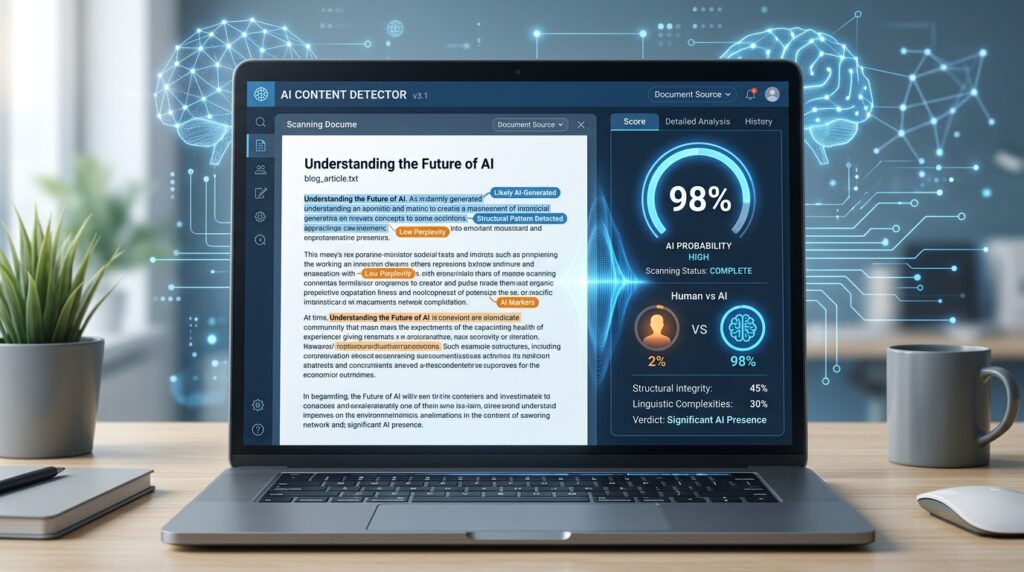
AI-generated content is everywhere now. Students use AI to brainstorm essays. Marketers use it to draft blog posts. Businesses use it to write emails, landing pages, product descriptions, and social media captions. That has created one big question:
Was this written by a human or by AI?
That is where an AI detector comes in.
An AI detector is a tool that analyzes written text and estimates whether it was likely written by a human, generated by AI, or edited with AI. These tools are also called AI content detectors, AI checkers, AI writing detectors, or ChatGPT detectors.
But there is one important thing to understand from the start: an AI detector does not “prove” that someone used AI. It gives a probability score based on writing patterns. That means AI detection can be useful, but it should never be treated as perfect evidence.
Evidence checkpoint: OpenAI withdrew its own text classifier because of its low accuracy. Turnitin warns that results below 20% have a higher incidence of false positives, while peer-reviewed research has documented false-positive risks for non-native English writers. Use a score to begin a review—not to accuse, punish, reject, or publish a claim about someone.
In this guide, you will learn what an AI detector is, how it works, how accurate AI content detection tools are, who uses them, what their limitations are, and which AI detector tools are worth considering.
What Is AI-Generated Text?
AI-generated text is writing created by artificial intelligence tools such as ChatGPT, Gemini, Claude, Copilot, Jasper, Writesonic, or other large language models.
These tools are trained on massive amounts of text. When you give them a prompt, they predict and generate words based on patterns they have learned from data.
Examples of AI-generated text include:
- A blog post written by ChatGPT
- A product description created by an AI writing tool
- A school essay drafted by an AI assistant
- A marketing email generated from a prompt
- A social media caption written by Gemini or Claude
- A rewritten paragraph produced by a paraphrasing tool
AI-generated text is not always bad. It can help with brainstorming, outlining, editing, summarizing, and improving clarity. The problem starts when AI is used without disclosure, without fact-checking, or as a replacement for original thinking.
For example, a student using AI to understand a topic is different from submitting a fully AI-written essay as original work. A marketer using AI to structure an article is different from publishing hundreds of generic AI posts with no experience, no fact-checking, and no human review.
That difference matters.
What Is an AI Content Detector?
An AI content detector is a tool that scans text and estimates whether it looks like it was written by artificial intelligence.
Most AI detector tools give a score such as:
- 95% likely AI-generated
- 60% AI / 40% human
- Human-written
- AI-refined
- Mixed human and AI
- Low, medium, or high probability of AI use
Some tools also highlight specific sentences or paragraphs that seem more AI-like.
An AI detector is mainly used to check written text. It is not the same as an AI image detector or AI video detector. If you want to check AI-generated images, deepfakes, or synthetic video, you need a different type of detection tool.
How Does an AI Detector Work?
AI detectors work by analyzing patterns in the text. They look for signals that are more common in AI writing than in natural human writing.
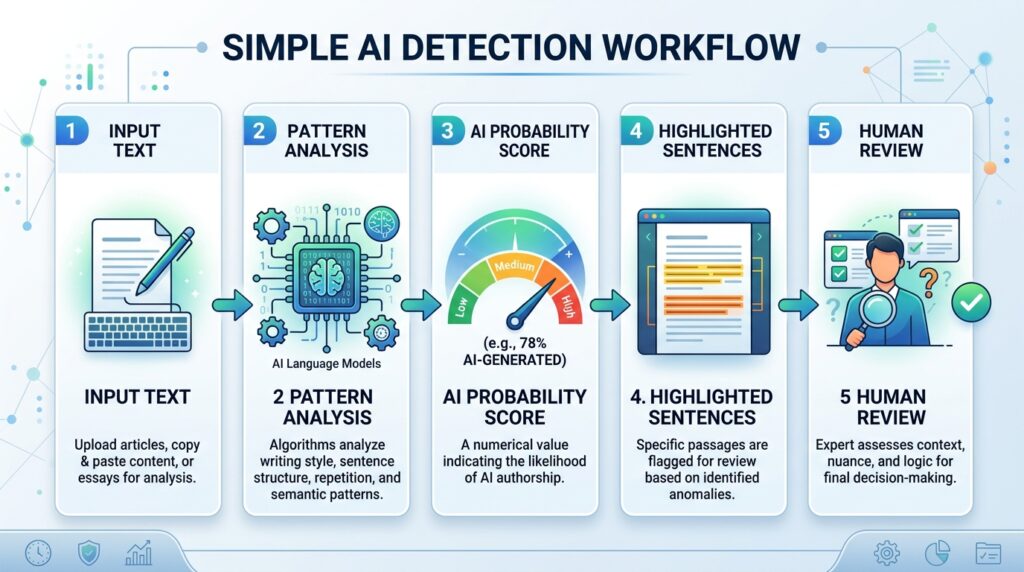
These signals may include predictability, sentence structure, word choice, repetition, formatting patterns, and the overall flow of ideas.
1. Predictability
AI models often produce text that is smooth, balanced, and predictable. That can make the writing feel polished but sometimes generic.
For example, AI-generated paragraphs often follow a neat structure:
- Define the topic
- Explain why it matters
- Give a general example
- End with a safe conclusion
That structure is not wrong, but when every paragraph sounds equally polished and predictable, an AI checker may flag it.
2. Perplexity
Perplexity is a technical way of measuring how predictable a piece of writing is.
In simple terms:
- Low perplexity means the text is very predictable.
- High perplexity means the text is more surprising or varied.
AI-generated text often has lower perplexity because AI tends to choose words that are statistically likely to come next.
Human writing can be messier. People repeat themselves, use unusual phrases, shift rhythm, add personal examples, and sometimes write imperfectly. That variation can make human writing harder to predict.
3. Burstiness
Burstiness refers to variation in sentence length and structure.
Human writing often has bursts of variety. A person might write one short sentence, then a longer one with detail, then a question, then a personal example.
AI writing often has a more even rhythm. Sentences may be similar in length, tone, and structure.
Example of AI-like rhythm:
“AI tools can improve productivity. They can help users save time. They can also support better writing. However, users should review the output carefully.”
Example of more human rhythm:
“AI can save time, yes. But it can also make your writing sound like everyone else’s if you publish it without editing. That is the part many people miss.”
The second version has more natural rhythm and stronger human judgment.
4. Repetitive phrasing
AI-generated content often repeats common phrases such as:
- In today’s digital world
- It is important to note
- A game-changer
- Unlock the power of
- In conclusion
- Seamlessly
- Robust
- Leverage
- Enhance productivity
- Whether you are a student, teacher, or professional
These phrases are not automatically bad, but if a text is full of them, it may look machine-generated.
5. Sentence-level scoring
Some AI detectors analyze each sentence separately. They highlight lines that appear more likely to be AI-generated.
This is useful because many documents are mixed. One paragraph may be written by a human, another may be AI-generated, and another may be human-written but polished with AI.
6. Model-based classification
More advanced AI content detection tools use machine learning models trained to classify text. Instead of relying only on simple rules, they compare the submitted text against patterns found in human-written and AI-generated samples.
This is why different AI detectors can give different results for the same text. Each tool uses its own model, training data, thresholds, and scoring system.
AI Detector vs Plagiarism Checker: What Is the Difference?
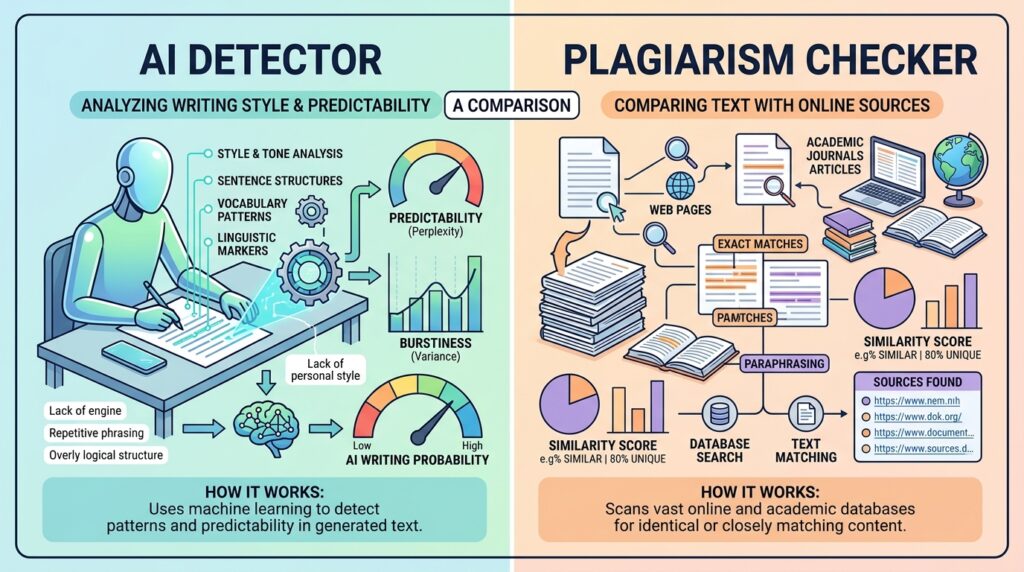
An AI detector and a plagiarism checker are not the same tool.
| Tool | What it checks | Example |
|---|---|---|
| AI detector | Whether text looks AI-generated | “This paragraph is 82% likely AI-written.” |
| Plagiarism checker | Whether text is copied from another source | “This sentence matches a webpage.” |
| Grammar checker | Spelling, grammar, tone, and clarity | “This sentence has a grammar issue.” |
| Fact checker | Whether claims are accurate | “This statistic needs verification.” |
A plagiarism checker compares your text against existing sources. An AI detector does not usually prove copying. It estimates whether the writing style resembles AI-generated text.
That means a text can be:
- Original but AI-generated
- Human-written but plagiarized
- AI-written and plagiarized
- Human-written and original
- Human-written but wrongly flagged as AI
For serious content review, use more than one method: AI detection, plagiarism checking, fact-checking, source review, and human judgment.
How Accurate Are AI Content Detection Tools?
AI detectors can be useful, but they are not 100% accurate.
The accuracy depends on many factors:
- Length of the text
- Writing style
- Language
- Topic
- AI model used
- Whether the text was paraphrased
- Whether a human edited the text
- Whether the writer is a non-native English speaker
- Whether the text is formal, academic, or technical
Longer text is usually easier to analyze than a short paragraph. A 1,200-word article gives the AI detector more patterns to evaluate. A 60-word answer may not be enough for a reliable result.
Why AI detectors can be wrong
AI detectors can produce two main types of errors.
False positive
A false positive happens when human-written text is wrongly flagged as AI-generated.
This can happen when the writing is very formal, clean, repetitive, or structured. It can also happen with non-native English writing because some learners use simpler sentence patterns that detectors may wrongly associate with AI.
Example:
A student writes a clear but simple essay in English. The AI detector flags it as AI-generated because the sentences are predictable. That does not prove the student used AI.
False negative
A false negative happens when AI-generated text is marked as human-written.
This can happen when the AI text is heavily edited, paraphrased, mixed with human writing, or generated with a more advanced model.
Example:
A marketer uses AI to create a draft, rewrites half of it, adds personal examples, changes the structure, and edits the tone. The detector may not clearly identify the AI involvement.
Do AI Detectors Really Work?
Yes, AI detectors can work in some cases, especially when checking long, unedited, fully AI-generated text.
However, they do not work perfectly in all situations.
AI detectors are best used as a warning signal, not as final proof.
A good way to think about it:
An AI detector can tell you, “This text looks suspicious.” It cannot always tell you, “This person definitely used AI.”
For low-risk content, such as checking a blog draft before publishing, an AI detector can be helpful. For high-risk situations, such as accusing a student or employee of misconduct, detection scores should be combined with other evidence.
Better evidence may include:
- Draft history
- Google Docs version history
- Writing process records
- Oral explanation from the writer
- Source quality
- Citation accuracy
- Previous writing samples
- Assignment instructions
- Human review
What Is the Best AI Detector?
There is no single best AI detector for everyone. The best choice depends on your use case.
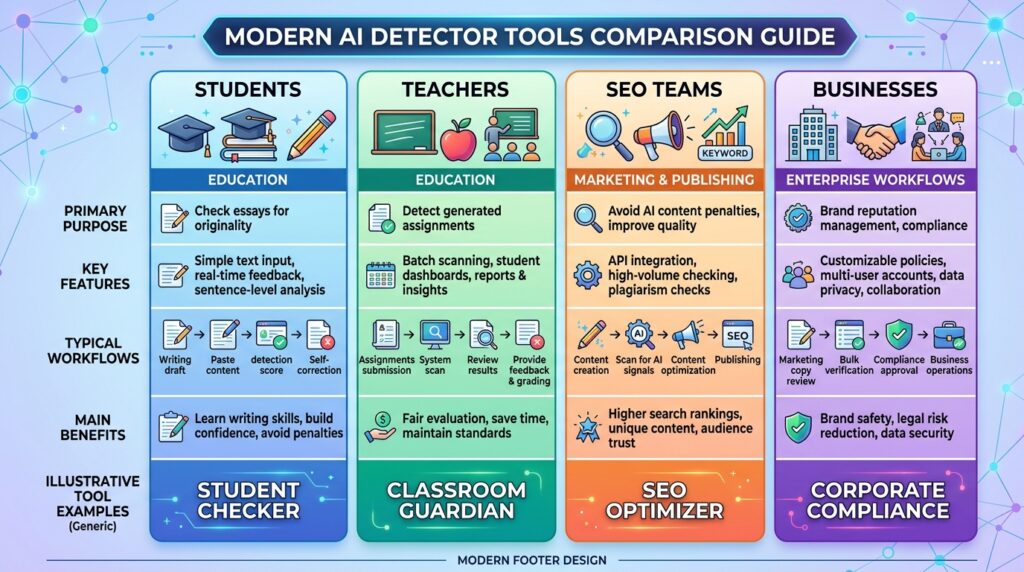
A teacher, SEO editor, student, agency owner, and enterprise compliance team do not need the same tool.
Here are some of the best AI detector tools to consider.
How this AI detector shortlist was evaluated
This is an editorial shortlist, not a laboratory accuracy ranking. Tools were assessed by their intended audience, supported inputs and languages, sentence- or paragraph-level feedback, plagiarism or authorship features, reporting options, integrations, and how clearly the provider explains limitations. Realaiva did not reproduce every vendor accuracy claim on one controlled benchmark, so percentages on vendor pages should be treated as provider claims and checked against independent evidence.
Features, limits, prices, and supported models change frequently. Test the same known human, known AI, and mixed samples from your own use case before adopting any detector, and record false positives as well as missed detections.
Best AI Detector Tools Compared
1. Originality.ai
Best for: SEO teams, publishers, agencies, and content marketers
Originality.ai is popular among website owners and content teams because it combines AI detection with plagiarism checking, readability analysis, and content quality tools.
It is a strong option if you publish articles at scale and want to check whether freelance or agency content looks AI-generated.
Good for:
- Blog content review
- SEO content teams
- Freelance writer checks
- Agency workflows
- AI + plagiarism checking
- Shareable reports
Limitations:
- It is not mainly built for classrooms
- Scores should still be reviewed manually
- Heavily edited or mixed content can be harder to classify
2. GPTZero
Best for: Education, writing review, and sentence-level feedback
GPTZero is one of the most well-known AI detector tools. It is widely used by educators, students, and writers who want to check whether text appears AI-generated.
It often provides sentence-level analysis and writing feedback, which can help users understand which parts of a document look suspicious.
Good for:
- Essays
- Academic writing
- Student drafts
- Writing process review
- Sentence-level detection
Limitations:
- False positives are possible
- Results may vary by text length and writing style
- Should not be used as the only proof of AI use
3. Copyleaks AI Detector
Best for: Schools, enterprises, multilingual detection, and API workflows
Copyleaks is a strong option for institutions and businesses because it supports multiple languages and offers integrations for learning management systems and APIs.
This makes it useful for organizations that need AI detection built into an existing workflow.
Good for:
- Universities
- Schools
- Enterprise content review
- LMS integration
- API-based detection
- Multilingual content
Limitations:
- More advanced features may require paid access
- Institutional use still needs clear policy and human review
4. Turnitin AI Detector
Best for: Academic institutions already using Turnitin
Turnitin is widely known for plagiarism detection and academic integrity tools. Its AI writing detection feature is mainly used by schools, colleges, and universities.
It can be useful for educators, but it should be used carefully because a score alone should not decide misconduct.
Good for:
- Universities
- Teachers
- Student submissions
- Academic integrity workflows
- Institutions already using Turnitin
Limitations:
- Not usually a public free tool
- Can create serious consequences if misused
- Needs instructor judgment and supporting evidence
5. QuillBot AI Detector
Best for: Students, writers, and quick free checks
QuillBot offers a simple AI detector that is easy to use. It is useful for checking short drafts, essays, rewritten paragraphs, and general writing.
Because QuillBot is also known for paraphrasing, its AI detector is especially relevant for people checking rewritten or AI-refined text.
Good for:
- Quick checks
- Students
- Bloggers
- AI-refined text
- Simple scoring
Limitations:
- Free tools may have limits
- Should not be treated as final proof
- Short text can be difficult to judge
6. Scribbr AI Detector
Best for: Students, educators, and academic-style writing
Scribbr is well-known in academic writing, citations, plagiarism checking, and student tools. Its AI detector is useful for checking whether academic text appears human-written, AI-generated, or AI-refined.
Good for:
- Essays
- Student papers
- Academic writing
- Paragraph-level feedback
- AI-refined content checks
Limitations:
- Some advanced detection may require premium access
- No AI detector can guarantee perfect accuracy
7. Grammarly AI Detector
Best for: Everyday writers who already use Grammarly
Grammarly now offers AI detection as part of its writing ecosystem. This is useful for students, professionals, and writers who already use Grammarly for grammar, clarity, and tone.
Good for:
- Everyday writing
- Students
- Professionals
- Quick AI checks
- Grammar + AI workflow
Limitations:
- It is not a full plagiarism investigation tool by itself
- Detection results still need human judgment
8. Winston AI
Best for: Teachers, publishers, and document-based checks
Winston AI is another AI detector used by educators, publishers, and teams that need content authenticity checks.
Some users choose it for document scanning, reports, and content review workflows.
Good for:
- Teachers
- Publishers
- Agencies
- Document review
- AI detection reports
Limitations:
- Paid features may be needed for serious use
- Results should be compared with other evidence
Best AI Detector by Use Case
| Use case | Recommended tools |
|---|---|
| Best for SEO content teams | Originality.ai, Copyleaks |
| Best for students | QuillBot, Scribbr, Grammarly |
| Best for teachers | Turnitin, GPTZero, Copyleaks |
| Best free AI detector | QuillBot, Scribbr, Grammarly, GPTZero |
| Best for agencies | Originality.ai, Copyleaks |
| Best for multilingual checks | Copyleaks, Scribbr, QuillBot |
| Best for academic integrity | Turnitin, GPTZero, Scribbr |
| Best for API integration | Copyleaks, Originality.ai |
Who Uses AI Detectors?
AI detectors are used by many different groups, but each group uses them for a different reason.
Students
Students use AI detectors to check whether their essays may be flagged before submission. This is especially important when a university has strict AI writing rules.
However, students should not use AI detectors only to “beat” detection. A better approach is to use AI responsibly, cite assistance if required, and make sure the final work reflects their own understanding.
Teachers and universities
Educators use AI detection tools to identify possible AI misuse in assignments. But responsible educators should not rely only on an AI score.
A fair review process should include writing history, student explanation, assignment design, and human judgment.
How to Use AI for Competitive Analysis: Tools, Prompts, and Workflow?
Bloggers and SEO writers
Bloggers use AI detector tools to check content before publishing. This is useful when working with freelance writers, guest post contributors, or content agencies.
For SEO, the goal is not simply to “pass AI detection.” The real goal is to publish helpful, original, accurate content that includes first-hand insight.
Marketing teams
Marketing teams use AI checkers to review website copy, ads, emails, landing pages, and blog drafts.
AI can help speed up content creation, but brand voice and originality still matter. If every article sounds like a generic AI answer, users will notice.
Publishers and editors
Editors use AI detection as part of quality control. They may check whether submitted articles are original, whether sources are real, and whether the writer has added original analysis.
Businesses
Businesses use AI detector tools to review employee writing, outsourced content, support documents, and compliance-sensitive materials.
For high-stakes decisions, businesses should create clear AI usage policies instead of relying only on detection scores.
Do AI Detectors Work on All Types of Text?
No. AI detectors do not work equally well on all types of text.
They are usually better with:
- Longer essays
- Blog posts
- Articles
- Reports
- Standard prose
- Formal writing
They are usually weaker with:
- Very short text
- Bullet points
- Poetry
- Code
- Social media captions
- Product descriptions
- Highly technical writing
- Non-native English writing
- Heavily edited AI text
- Mixed human and AI writing
For example, a 30-word Instagram caption is too short for reliable AI detection. A 1,500-word article gives the detector more data to analyze.
Can AI Detectors Check PDF and Word Documents?
Some AI detector tools allow users to upload files such as PDF, DOCX, or Word documents. Others require you to copy and paste the text manually.
If you are checking a PDF or Word document, keep these points in mind:
- Scanned PDFs may need OCR before detection
- Formatting can affect extraction quality
- Footnotes, references, and tables may confuse the score
- Longer body text gives more reliable results
- Always review highlighted sections manually
For academic or professional documents, do not rely only on the final percentage. Check the actual paragraphs that were flagged.
Is It Possible to Detect Paraphrased AI Content?
Sometimes, yes. But it is harder.
Paraphrased AI content is text that was generated by AI and then rewritten by another tool or edited by a human. This can reduce the obvious AI patterns.
Some AI detectors claim to identify AI-paraphrased or AI-refined content, but detection becomes less reliable as more human editing is added.
Example:
An AI tool writes this:
“Artificial intelligence has transformed the way businesses create content by improving speed, efficiency, and scalability.”
A paraphrased version might be:
“AI has changed content production for businesses by making the process faster and easier to scale.”
Both versions may still sound AI-like. But if a human adds experience, data, examples, and a unique viewpoint, the text becomes harder to classify.
The ethical solution is not to hide AI. The better solution is to add real value:
- Personal experience
- Original examples
- Clear opinions
- Real screenshots
- Data
- Expert quotes
- Accurate sources
- Case studies
- Better structure
- Human editing
That improves content quality, not just detection scores.
What If My Work Is a Mix of AI and Human Writing?
Mixed AI and human writing is now common.
For example, you might use AI to:
- Create an outline
- Summarize research
- Rewrite a sentence
- Fix grammar
- Generate title ideas
- Create a first draft
- Improve readability
Then you may add your own examples, research, opinions, and final edits.
An AI detector may classify mixed content in different ways. It may say the whole text is partially AI-generated, or it may highlight only certain paragraphs.
If your work is mixed, the safest approach is:
- Follow your school, client, or company policy.
- Keep your drafts and version history.
- Add your own analysis and examples.
- Fact-check every claim.
- Do not submit AI output as your original thinking.
- Disclose AI assistance when required.
For SEO content, mixed AI use is not automatically a problem. The bigger issue is whether the content is helpful, original, accurate, and written for real readers.
Can AI Detectors Detect ChatGPT, Gemini, Claude, and Other AI Tools?
Most AI detectors are designed to detect text from common AI writing tools such as ChatGPT, Gemini, Claude, Copilot, Jasper, and other large language models.
However, detection becomes harder when:
- The text is heavily edited
- The text is translated
- The text is paraphrased
- The content is short
- The writer adds personal examples
- The AI model is newer than the detector’s training data
- The content uses a very specific technical style
This is why AI detector tools need regular updates. As AI models improve, AI-generated text becomes more natural, and detectors need to adapt.
Should You Use an AI Detector Before Publishing Content?
Yes, but only as one part of your content workflow.
If you run a blog, agency, or AI tools website, an AI detector can help you review content before publishing. But do not make the mistake of thinking a low AI score automatically means the content is good.
A better publishing workflow looks like this:
Step 1: Check search intent
Before writing, understand what the reader wants. For the keyword “ai detector,” the reader may want a tool, a definition, accuracy information, or a comparison.
Step 2: Create an original outline
Do not copy the top-ranking pages. Build a better structure that answers more questions clearly.
Step 3: Add expert insight
Include practical examples, limitations, use cases, and warnings. This is what makes the article helpful.
Step 4: Check for AI patterns
Use an AI detector to find sections that sound too generic, repetitive, or machine-written.
Step 5: Check plagiarism
Use a plagiarism checker separately. AI detection and plagiarism detection are different.
Step 6: Fact-check claims
AI-generated content can include wrong facts, outdated claims, or fake citations. Always verify tool features, pricing, and technical claims.
Step 7: Edit for human value
Add real examples, screenshots, comparisons, and clear recommendations.
How to Interpret an AI Detector Score
AI detector scores can be confusing. A percentage does not always mean what people think it means.
If a tool says “80% AI,” it usually means the text has patterns that strongly resemble AI-generated writing. It does not always mean 80% of the text was definitely written by AI.
A practical interpretation:
| Score | Meaning | What to do |
|---|---|---|
| 0–20% AI | Likely human-written | Still check quality and plagiarism |
| 21–50% AI | Mixed or uncertain | Review highlighted sections |
| 51–80% AI | Strong AI-like patterns | Add original examples and human editing |
| 81–100% AI | Very likely AI-generated | Rewrite with real experience, evidence, and clearer voice |
Do not panic over a single score. Test longer text, compare multiple tools, and review the actual writing.
Common Reasons Human Writing Gets Flagged as AI
Human writing can be flagged as AI for many reasons.
1. The writing is too generic
Generic writing often sounds like AI because it avoids strong opinions and specific examples.
Instead of:
“AI detectors are useful tools for improving content quality.”
Write:
“An AI detector is useful when reviewing outsourced blog posts, but it should not be used as a final judgment tool because false positives can happen.”
2. The structure is too perfect
AI writing often uses balanced paragraphs and repeated patterns. Human writing usually has more variation.
3. The topic is technical
Technical writing can be formal and predictable, which may trigger detection.
4. The writer is a non-native English speaker
Non-native English writers may use simpler sentence structures, which some detectors may misread as AI-like.
5. The text was edited by AI
Even if the original idea was human-written, using AI to polish grammar and tone can make the final version look AI-refined.
How to Make Content More Original Without Trying to Bypass AI Detection
Do not focus on “tricking” AI detectors. Focus on making the content genuinely better.
Here is how:
- Add first-hand experience
- Use specific examples
- Include real problems and solutions
- Mention who the advice is for
- Add screenshots or step-by-step workflows
- Avoid empty phrases
- Use natural sentence variety
- Add expert commentary
- Fact-check every claim
- Explain trade-offs, not just benefits
- Include limitations and honest warnings
Example of generic AI-style writing:
“AI detectors are powerful tools that help users identify AI-generated content and improve originality.”
Better human-style version:
“An AI detector is useful when a content manager receives a suspiciously polished article from a freelancer. But the score should start a review, not end it. The editor still needs to check sources, examples, structure, and whether the writer actually understands the topic.”
The second version is more useful because it gives context, use case, and judgment.
Are AI Detectors Good for SEO?
AI detectors can support SEO quality control, but they do not replace SEO strategy.
Passing an AI detector is not a Google ranking factor. Google advises publishers to create helpful, reliable, people-first content and warns against scaled content created mainly to manipulate rankings. Evaluate usefulness, accuracy, experience, and intent directly instead of optimizing for a detector score.
If you include a detector in an editorial workflow, use its score only to select passages for manual review. A detector cannot measure all the quality issues below, but a human editor should check for:
- Generic paragraphs
- Repetitive phrasing
- Over-polished AI tone
- Weak introductions
- Thin explanations
- Missing examples
- Content that sounds copied from AI tools
But also check:
- Search intent
- Keyword coverage
- Internal links
- Topical authority
- Page speed
- Author credibility
- Original images
- FAQ quality
- Schema markup
- Content freshness
For a website like Realaiva, the best strategy is not just to list AI detector tools. You should explain how they work, when they fail, how to interpret scores, and which tool fits each use case.
That is the type of content that can perform better in Google and AI search results.
Practical Example: How a Content Team Should Use an AI Detector
Imagine you run a blog and hire freelance writers.
A writer sends a 2,000-word article. It looks clean, but something feels generic.
Here is a smart review process:
- Run the article through an AI detector.
- Check if specific paragraphs are flagged.
- Run a plagiarism scan.
- Check all statistics and tool claims.
- Ask the writer for sources or screenshots.
- Compare the article with your brand voice.
- Add original examples and internal links.
- Edit weak sections before publishing.
Bad workflow:
“The AI detector says 72% AI, so reject it immediately.”
Better workflow:
“The AI detector flagged several sections. Let’s review those paragraphs, ask for clarification, and check whether the article contains original insight.”
That is a fairer and more accurate approach.
AI Detector Limitations You Should Know
AI detectors have real limitations.
They may struggle with:
- Short content
- Translated content
- Paraphrased content
- Hybrid human + AI writing
- Non-native English writing
- Formal academic writing
- Highly edited AI drafts
- New AI models
- Technical documentation
- Bullet-heavy content
They also cannot always tell intent. A detector cannot know whether a writer used AI to cheat, brainstorm, translate, edit grammar, or improve clarity.
That is why AI detection should be part of a review system, not the entire system.
How to Choose the Right AI Detector
Before choosing an AI detector, ask these questions:
What type of content are you checking?
For essays, choose tools built for academic writing. For SEO articles, choose tools built for publishers and content teams.
Do you need plagiarism checking too?
If yes, choose a tool that includes both AI detection and plagiarism detection.
Do you need multilingual support?
If you work with international writers, choose a detector that supports multiple languages.
Do you need reports?
Teachers, agencies, and businesses may need shareable reports.
Do you need API access?
Enterprises and SaaS platforms may need API-based AI detection.
Is the decision high-risk?
If the result could affect someone’s education, job, or reputation, never rely on one AI detector score alone.
Final Verdict: Are AI Detectors Worth Using?
AI detectors can be useful as optional screening tools when their limits match the task. They are not reliable enough to establish authorship or misconduct on their own.
They are useful for:
- Spotting likely AI-generated content
- Reviewing outsourced writing
- Checking academic submissions
- Improving editorial quality
- Identifying generic AI-style paragraphs
- Supporting content authenticity workflows
But they are not perfect. They can produce false positives and false negatives. They should not be used as the only evidence in serious decisions.
The best approach is simple:
Use an AI detector as a signal, not a verdict.
For students, the goal should be honest learning. For teachers, the goal should be fair assessment. For marketers and bloggers, the goal should be helpful, original content that readers actually trust.
AI detectors can help with that, but human judgment still matters most.
FAQs About AI Detectors
What is AI-generated text?
AI-generated text is writing created by artificial intelligence tools such as ChatGPT, Gemini, Claude, Copilot, or other AI writing platforms. It can include essays, blog posts, emails, captions, summaries, product descriptions, and reports. AI-generated text may be useful as a draft or brainstorming tool, but it should be reviewed, fact-checked, and edited by a human before serious use.
What is an AI content detector?
An AI content detector is a tool that analyzes text and estimates whether it was written by a human, generated by AI, or edited with AI. It looks at writing patterns such as predictability, sentence structure, repetition, word choice, and overall flow. Most AI detectors give a probability score rather than absolute proof.
How accurate are AI content detection tools?
AI content detection tools can be accurate in some situations, especially with long, unedited AI-generated text. However, no AI detector is 100% accurate. Results can be affected by text length, writing style, language, paraphrasing, editing, and whether the text is mixed with human writing. AI detector results should always be reviewed carefully.
Do AI detectors really work?
AI detectors do work as probability tools, but they do not work perfectly. They can help identify text that looks AI-generated, but they cannot always prove that a person used AI. They are best used as part of a broader review process that includes human judgment, plagiarism checking, source review, and writing history.
What is the best AI detector?
The best AI detector depends on your needs. Originality.ai is popular for SEO teams and publishers. GPTZero is widely used in education. Copyleaks is strong for multilingual and enterprise workflows. Turnitin is common in academic institutions. QuillBot, Scribbr, and Grammarly are useful for students, writers, and quick checks.
Who uses AI detectors?
AI detectors are used by students, teachers, universities, bloggers, SEO writers, marketing teams, publishers, editors, agencies, and businesses. Students may use them to check assignments, while editors and marketers use them to review content before publishing. Educators use them as part of academic integrity workflows.
Do AI detectors work on all types of text?
No. AI detectors do not work equally well on all text types. They are usually better with longer essays, blog posts, and formal writing. They are weaker with short captions, bullet points, code, poetry, highly technical text, translated text, and heavily edited AI writing.
Is it possible to detect paraphrased AI content?
Sometimes. Some AI detectors can identify AI-refined or paraphrased content, but it is harder than detecting raw AI-generated text. If AI text is rewritten, edited, translated, or mixed with human writing, detection becomes less reliable. That is why AI detector scores should not be treated as final proof.
What if my work is a mix of AI and human writing?
If your work is a mix of AI and human writing, an AI detector may mark it as partially AI-generated or AI-refined. The best approach is to follow your school, client, or company policy. Keep your drafts, add your own analysis, fact-check the content, and disclose AI assistance when required.
Sources, testing note, and last update
- OpenAI: retired AI text classifier and accuracy limitations
- Turnitin: interpreting AI Writing Report scores
- Liang et al.: detector bias affecting non-native English writers
- GPTZero: detection technology and stated limitations
- Google Search: creating helpful, reliable, people-first content
Editorial disclosure: this article contains no paid placement. Tool capabilities and provider claims were checked against official pages, but Realaiva did not run a controlled independent accuracy benchmark. Last fact-checked: August 10, 2026.
Download the AI Ad Poster Prompt Pack
Want a faster way to create ad-poster concepts with AI? Get the prompt pack, adapt the instructions to your product or campaign, and review every generated claim, image, and brand detail before publishing.
About The Author





Bom conteúdo. Recomendo TextSong — /. TextSong
Thank you!
Intéressant. Vidéo IA : Pixwit . Pixwit
Bookmarking this for later. Creators might like Swift-image here: /. Swift-image
Nice perspective on the topic. You may find Muse Voice Transcribe useful — . Muse Voice Transcribe