June 3, 2026

Best Free AI Tools in 2026: 25 Tools You Can Use Without Paying

Best free AI tools in 2026 workspace with floating cards for writing design video coding and automation

A focused free AI stack lets students, creators, bloggers, and small businesses move faster in 2026. No subscriptions required to start.

Two years ago, “free AI tool” usually meant a stripped-down demo that gave you three outputs and then begged for your credit card. That is no longer true. In 2026, you can run an entire workflow research, writing, design, video editing, coding, automation, and study on free plans alone, and only pay once a specific tool starts saving you real hours or making you real money.

But there is a catch worth saying plainly up front: “free” does not mean the same thing twice. ChatGPT free is a daily message cap. Zapier free is exactly 100 automation tasks a month. Adobe Firefly free is a small pool of generative credits. Leonardo free is a daily token allowance that resets at midnight. Some tools are free and commercially safe; others quietly forbid using the output in monetized work. If you do not read the fine print, you will either hit a wall mid-project or publish something you did not have the rights to use.

This guide cuts through that. Every tool below is on the list because it does useful work on its free tier not because it is trending on TikTok. Whether you are a student, blogger, YouTuber, freelancer, small-business owner, marketer, or developer, the goal is the same: help you assemble a free AI stack you can actually rely on, and tell you the exact moment paying becomes worth it.

If you want the bigger-picture version of this for paid workflows, we also cover the best AI tools in 2026 for work, business, and productivity.

Table of Contents

Quick Answer: Best Free AI Tools in 2026

The strongest free AI tools in 2026 are ChatGPT for everyday assistance, Gemini for Google users, Claude for long-form writing review, Perplexity for research, NotebookLM for studying your own sources, Canva AI for design, Adobe Firefly for commercially-safe images, CapCut for short-form video, Grammarly for editing, Zapier or Make for automation, GitHub Copilot and Cursor for coding, ElevenLabs for voice, and Tally for lead forms.

If you only want a starter stack, this is enough for 90% of people:

  • ChatGPT: writing, planning, brainstorming
  • Perplexity: research and fact-finding
  • Canva AI: visuals and social graphics
  • Grammarly: final editing pass
  • CapCut: short video
  • Zapier or Make: automation
  • NotebookLM: document-based study and research

Master those seven before adding anything else.

How I Chose These Free AI Tools

For Realaiva readers, I do not recommend a tool because it went viral. Each pick had to clear the same bar:

  • It has a genuinely usable free plan, free trial, or free tier not a 24-hour tease.
  • It solves a real, recurring problem rather than a novelty one.
  • A beginner can get a useful result on day one.
  • It produces output good enough to use without forcing an immediate upgrade.
  • It has a clear upgrade path if your work becomes serious.
  • It earns its place for at least one core audience: students, creators, bloggers, small businesses, or developers.

The best free AI tool is rarely the most advanced one. It is the one that helps you finish real work faster without wasting an afternoon learning it.

Quick Comparison: Best Free AI Tools by Use Case

Free AI tools grouped by use case for 2026  writing research design video automation coding productivity
Free AI tools work far better when you group them by job rather than picking at random.
Use CaseBest Free AI ToolBest For
Everyday AI assistantChatGPTWriting, planning, brainstorming
Google ecosystemGeminiGoogle-style productivity and search help
Long-form writing reviewClaudeDraft review, tone, structured feedback
ResearchPerplexitySource-backed research and topic discovery
Studying your own filesNotebookLMPDF summaries, notes, study guides
DesignCanva AIBlog graphics, social posts, presentations
AI imagesAdobe FireflyCommercial-safe creative visuals
Social graphicsMicrosoft DesignerFast marketing visuals
Creative image generationLeonardo AIArt, product concepts, experiments
Images with textIdeogramPosters, thumbnails, title graphics
Short-form videoCapCutReels, Shorts, TikTok edits
Browser video editingVEEDSubtitles, resizing, quick edits
Podcast / talking-head editingDescriptTranscript-based editing
Grammar and clarityGrammarlyEditing emails, posts, articles
ParaphrasingQuillBotRewriting and summarizing
WorkspaceNotion AINotes, projects, content planning
Project managementClickUp AITasks, docs, project updates
Simple automationZapierConnecting apps without code
Visual automationMakeAdvanced workflow automation
Coding assistantGitHub CopilotCode completions and help
AI code editorCursorProject-aware coding
AI voiceElevenLabsVoiceover testing
AI musicSunoMusic ideas and creative audio
Forms and lead captureTallyForms, surveys, client intake
Windows / search assistantMicrosoft CopilotEveryday AI search and assistance

1. ChatGPT: Best Free AI Assistant for Everyday Work

ChatGPT is still the most versatile free AI tool for general productivity. On the free plan you can brainstorm, outline, summarize, explain hard topics, rewrite clumsy emails, build content calendars, and debug small scripts the daily message cap is the main constraint, not capability.

For bloggers and site owners specifically, it earns its keep on:

  • Article outlines and content briefs
  • Finding content gaps competitors missed
  • Drafting FAQ sections and meta descriptions
  • Rewriting weak introductions
  • Turning messy notes into structured drafts

The mistake most people make is pasting full AI articles straight to publish. Don’t. Use ChatGPT as a thinking partner for structure, angles, research questions, and editing then layer in your own experience, screenshots, and opinions. That is what separates a page that ranks from one Google ignores.

Practical example: Ask it to build a content brief for “best AI tools for students,” propose H2 headings, list real student use cases, and flag the angles competing articles usually skip. Then write the piece yourself. If writing is your main job, see our deeper roundup of the best AI tools for writing blog posts.

Best for: bloggers, students, freelancers, creators, beginners Limitations: free message limits, occasional hallucinations always verify facts Upgrade when: you use it daily for paid work or keep hitting the cap


2. Google Gemini: Best Free AI Tool for Google Users

Gemini is the obvious pick if your life already runs through Search, Gmail, Docs, Drive, YouTube, or Android. It handles explanations, quick writing, brainstorming, and research-style questions, and Google keeps pushing Gemini deeper into its products.

Where it really shines is the handoff between tasks inside the Google ecosystem drafting in Docs, summarizing a long email thread, or pulling a study plan out of a topic without switching apps.

Practical example: A student can ask Gemini to explain a concept in plain language, then immediately follow up with “now make a 5-day revision plan and 10 quiz questions” all in one thread. Not sure whether to lead with ChatGPT, Claude, or Gemini? Our ChatGPT vs Claude vs Gemini comparison breaks down which assistant wins for which job.

Best for: students, Google users, Android users, casual productivity Limitations: the strongest models and higher limits sit behind paid Google AI plans Upgrade when: you need higher usage or deeper Workspace integration


3. Claude: Best Free AI Tool for Long-Form Writing Review

Claude is the tool I reach for when the document is long, messy, or important. It is unusually good at improving tone, tightening arguments, simplifying dense explanations, and making writing sound human instead of robotic. Anthropic offers a free Claude plan, with paid tiers adding more usage and features.

Use it as a second set of eyes:

  • A blunt critique of an article draft
  • A cleaner, less promotional introduction
  • Better structure and flow
  • Feedback on which sections drag

Practical example: Paste a rough intro and prompt: “Make this more specific and human, cut the marketing tone, and keep the meaning.” The before/after is usually night and day.

Best for: writers, bloggers, students, researchers, editors Limitations: free usage limits apply on longer documents Upgrade when: you review long documents or write daily


4. Microsoft Copilot: Best Free AI Tool for Windows and Microsoft Users

Microsoft Copilot is the convenient default if you live in Windows, Edge, Bing, or Microsoft apps. It is positioned as an everyday AI companion for getting answers, learning, and light creation.

It is rarely the most creative assistant in this list, but it is right there in your taskbar which, for quick lookups and short writing tasks, often beats opening a new tab.

Best for: Windows users, Microsoft users, search-style help Limitations: the business-grade Microsoft 365 Copilot is a separate paid product from the free consumer Copilot Upgrade when: your company already runs Microsoft 365 and needs in-app work integration


5. Perplexity: Best Free AI Research Assistant

Perplexity is the best free starting point for research because it answers with sources attached. That makes it ideal for quick market scans, competitor summaries, definitions, and validating a topic before you commit to writing about it. Its own description centers on credible, up-to-date answers you can keep questioning.

Before writing anything, it helps you map:

  • What a topic actually means
  • What real users are asking
  • Which tools or claims are currently popular
  • Which numbers need verifying from a primary source

Practical example: Before writing about AI video editors, use Perplexity to map the landscape then open each tool’s official pricing page yourself to confirm the free-plan details before publishing. (That two-step habit is exactly how this article was fact-checked.)

Best for: research, SEO writers, students, analysts Limitations: still needs human fact-checking; treat it as a starting point Upgrade when: you need advanced search modes or higher daily limits


6. NotebookLM: Best Free AI Tool for Studying Your Own Sources

NotebookLM is not a general chatbot it only answers from sources you upload, which makes its answers far more trustworthy for study and research. Google positions it as a research tool and thinking partner that turns dense material into clear summaries.

It is excellent for:

  • Summarizing PDFs and research papers
  • Building study notes and FAQs from your own documents
  • Comparing several sources side by side
  • Turning reports into outlines

Practical example: Upload three reports on AI adoption and ask for the key takeaways, a comparison table, and a list of claims worth double-checking before you cite them.

Best for: students, researchers, writers, educators Limitations: output quality is only as good as the sources you feed it Upgrade when: you need higher source limits or premium Gemini/NotebookLM features. For a study-specific stack, see the best AI tools for students.

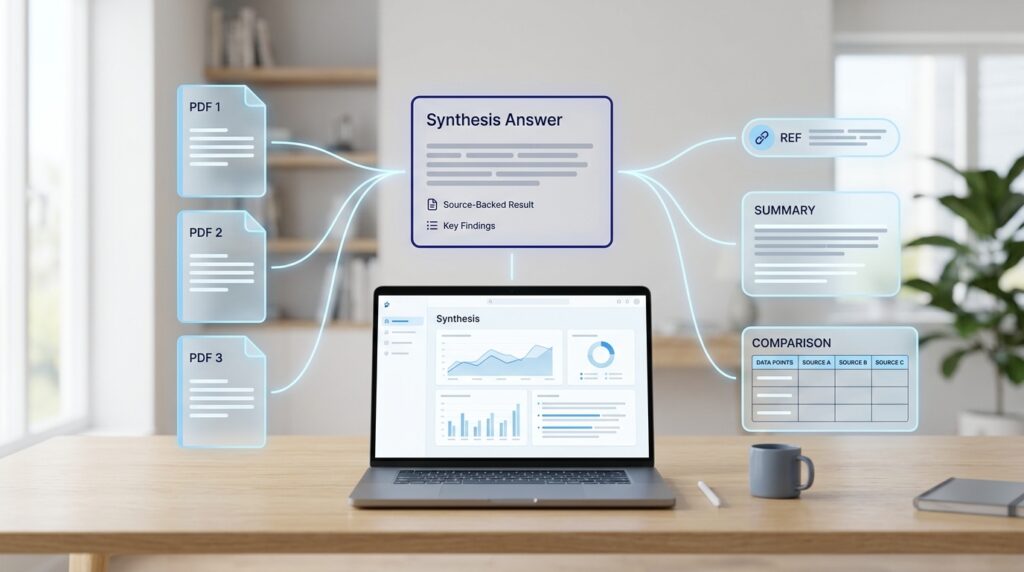
Free AI research tools producing source-backed summaries citations and study notes in 2026
Good AI research tools earn trust by showing their sources always verify before you cite.

7. Canva AI: Best Free AI Design Tool for Non-Designers

Canva remains the easiest path from “I need a graphic” to “done” for anyone who is not a designer. Its AI features are available on the free plan, with higher usage on paid tiers.

Use it for Pinterest pins, blog featured images, social posts, presentations, thumbnails, infographics, and simple brand graphics.

Practical example: Generate a Pinterest pin for a post, spin up three headline variations, then one-click resize the same design for Instagram, Facebook, and your blog.

Best for: bloggers, creators, small businesses, students.
Limitations: premium templates, brand kits, and some AI features need a paid plan.
Upgrade when: you need brand kits, premium assets, or higher AI usage


8. Adobe Firefly: Best Free AI Image Tool for Commercial-Safe Creative Work

Firefly is the pick when brand safety matters. Adobe promotes it as generative AI built for commercial creative work, with AI features running on a pool of generative credits.

Use it for blog visuals, creative backgrounds, product concepts, social graphics, image variations, and generative-fill experiments the kind of assets you would be nervous publishing from a model with murky training data.

Best for: designers, bloggers, marketers, brand-conscious creators
Limitations: credits and premium features vary by plan
Upgrade when: you need more generations or commercial workflows at scale


9. Microsoft Designer: Best Free AI Tool for Social Graphics

Microsoft Designer is built for speed: type what you want and get usable social posts, posters, and promo graphics without learning a full editor. It is the right tool when you need a passable marketing visual in two minutes, not a polished brand system.

Use it for social posts, promotional graphics, simple thumbnails, and event announcements.

Best for: social media creators, small businesses, beginners.
Limitations: less control than a full design platform.
Upgrade when: you need real brand control or advanced workflows


10. Leonardo AI: Best Free AI Image Tool for Creative Experiments

Leonardo is the favorite for AI art, game assets, product visuals, and concept work. Free users get a daily token allowance that resets each day.

Use it for concept art, product mockups, creative blog visuals, game-style images, and social experiments where you want stylistic range.

Best for: creators, designers, AI-image experimenters.
Limitations: daily token caps and public generations on the free tier.
Upgrade when: you need volume, faster generation, or private outputs


11. Ideogram: Best Free AI Tool for Images With Text

Most image models still mangle text. Ideogram is the exception it is built to render readable words, which makes it the go-to for posters, title cards, quote graphics, mock ads, and thumbnail concepts. Its free plan is always-free with limited public generations.

Best for: posters, thumbnails, title graphics, social designs.
Limitations: free generations are limited and public
Upgrade when: you need more generations, privacy, or faster output.

Free AI image generator and design tools compared for blog graphics typography and concept art in 2026
Design-focused AI tools cover blog visuals, social graphics, thumbnails, and creative concept work.

12. CapCut: Best Free AI Video Editing Tool for Creators

CapCut is the strongest free short-form editor, full stop. It is a genuinely capable editor with AI image/video tools, templates, a background remover, and auto-captions baked in.

Use it for TikToks, Reels, Shorts, auto-captions, talking-head clips, and turning blog posts into video.

Practical example: Turn an article into a 45-second Short write a hook, drop in stock footage, record a voiceover, auto-caption, and export vertical. Pair this with our guide on how to do YouTube SEO to get those Shorts actually found.

Best for: creators, YouTubers, TikTok editors, small businesses.
Limitations: some premium effects, templates, and exports are paid.
Upgrade when: you edit consistently or need premium assets


13. VEED: Best Browser-Based AI Video Tool for Quick Edits

VEED runs entirely in the browser, which makes it the fastest route to subtitles, screen recordings, resizing, and quick marketing clips with nothing to install. It positions itself as an online suite for recording, editing, and streaming in the cloud.

Best for: marketers, educators, creators, small teams.
Limitations: the free plan may include export or watermark limits.
Upgrade when: you need clean exports, longer videos, or brand assets


14. Descript: Best Free AI Tool for Podcast and Talking-Head Editing

Descript’s trick is editing audio and video by editing the transcript delete a word, delete the footage. The free plan includes limited monthly media hours, AI credits, and watermark-free 720p export.

It is ideal for podcasts, interviews, course clips, voice cleanup, and stripping filler words (“um,” “like”) automatically.

Best for: podcasters, YouTubers, educators, interview creators.
Limitations: free media hours and AI credits are limited.
Upgrade when: you publish episodes or videos weekly


15. Grammarly: Best Free AI Writing Assistant for Polishing Text

Grammarly is the final editing layer before anything goes out posts, emails, landing pages, proposals. The free plan covers grammar, spelling, tone visibility, and some AI prompt access.

Best for: students, bloggers, professionals, freelancers.
Limitations: advanced rewrites, plagiarism detection, and higher AI limits are paid
Upgrade when: writing quality directly affects your income

16. QuillBot: Best Free AI Paraphrasing and Summarizing Tool

QuillBot rewrites sentences, fixes clarity, summarizes passages, and checks grammar. Its free paraphraser and grammar checker are useful for tightening your own writing.

One rule: do not use it to spin someone else’s content. Use it when your own sentence is repetitive, unclear, or too long especially helpful for non-native English writers.

Best for: students, writers, bloggers, ESL writers.
Limitations: free modes and word limits apply.
Upgrade when: you need more modes, higher limits, or advanced support


17. Notion AI: Best AI Workspace Tool for Notes and Planning

Notion is already a strong home for notes, content calendars, databases, and projects; its AI layer (including agents) runs on Notion credits that vary by plan.

Use it for blog calendars, project planning, research notes, client workspaces, content databases, and meeting summaries.

Best for: creators, freelancers, students, teams.
Limitations: AI availability and limits vary by plan.
Upgrade when: Notion becomes your primary workspace


18. ClickUp AI: Best AI Project Management Assistant

ClickUp suits teams juggling content, tasks, clients, and recurring workflows. Its AI features run on AI Super Credits, and Free Forever workspaces get trial-level AI usage.

Use it for task summaries, project updates, content workflows, team notes, and SOP creation.

Best for: teams, agencies, content operations, small businesses.
Limitations: free AI usage is limited.
Upgrade when: you manage team projects or client delivery


19. Zapier: Best Free AI Automation Tool to Test Workflows

Zapier connects apps without code. The free plan includes unlimited Zaps, Tables, and Forms, but caps you at 100 automation tasks per month with two-step Zaps and 15-minute polling — verified against Zapier’s own help docs in 2026. That is enough to prove a workflow works, not to run a business on.

Practical example: When a lead fills out a form, Zapier sends the data to Google Sheets and triggers a follow-up email draft.

Reality check: a single contact form getting 50 submissions a month eats half your free tasks. Treat the free plan as a sandbox.

Best for: small businesses, freelancers, marketers, no-code beginners.
Limitations: 100 tasks/month and two-step Zaps; the next tier up is the real working plan.
Upgrade when: a workflow clearly saves time or earns revenue. For deeper setups, see the best AI tools for business automation.


20. Make: Best Free Visual Automation Builder

Make is the visual, node-based alternative to Zapier and tends to stretch further on its free tier there is no time limit on the free plan, and it is positioned as a visual platform for automations and AI agents.

Use it for content pipelines, lead routing, spreadsheet automation, AI summaries, CRM updates, and social workflows. If you find Zapier’s 100-task ceiling claustrophobic, Make is usually the next thing to try before paying.

Best for: automation builders, agencies, technical freelancers.
Limitations: free operations and active scenarios are limited
Upgrade when: workflows become business-critical


21. GitHub Copilot: Best Free AI Coding Assistant

GitHub Copilot is the most widely used AI coding assistant, and it now has a free plan alongside its paid tiers.

Use it for code suggestions, explaining unfamiliar code, writing tests, finishing repetitive blocks, and learning syntax faster.

Best for: developers, students, open-source contributors.
Limitations: free completions and advanced requests are capped.
Upgrade when: coding is part of your daily work


22. Cursor: Best AI Code Editor for Building Faster

Cursor is an AI-first code editor that understands your whole project, not just the open file. The free Hobby plan covers limited agent usage; paid plans unlock more sessions and frontier models.

Use it for building apps faster, navigating large codebases, fixing bugs, refactoring, and working with coding agents.

Best for: developers, indie hackers, SaaS builders, students.
Limitations: free agent usage is limited.
Upgrade when: you ship production apps or use agentic coding daily


23. ElevenLabs: Best Free AI Voice Tool for Voiceovers

ElevenLabs sets the bar for realistic AI voice. Its free tier lets you test voiceovers, narration, and product-demo voices, with paid plans and startup grants above that.

Important: before using AI voices in monetized videos, ads, or client work, confirm the current commercial rights for your plan.

Best for: YouTubers, creators, educators, marketers
Limitations: free usage and commercial rights are restricted
Upgrade when: you publish voiceovers commercially


24. Suno: Best Free AI Music Tool for Creative Testing

Suno generates music from text prompts. The free plan is enough to explore ideas, with paid plans for more access and advanced features.

Important: always check commercial-use terms before putting AI music in monetized content, ads, or client projects.

Best for: creators, musicians, YouTubers, social editors
Limitations: commercial rights and limits vary by plan
Upgrade when: you need commercial use or higher generation limits


25. Tally: Best Free Form Tool for AI Workflows and Lead Capture

Tally is not strictly an “AI tool,” but it is the connective tissue of AI workflows. It offers unlimited forms and submissions for free within fair-use guidelines, with the company stating that the large majority of features are free.

Use it for lead capture, client intake, surveys, content-brief forms, newsletter signups, and feeding inputs into AI automations.

Practical example: Collect a client brief in Tally → push the response to Google Sheets → use Zapier or Make to generate a summary and a follow-up email draft. That little chain is the backbone of a lot of one-person businesses.

Best for: small businesses, freelancers, agencies, bloggers
Limitations: advanced business features need a paid plan
Upgrade when: you need custom domains, advanced integrations, or business controls

Best Free AI Tool Stack by User Type

Best Free AI Tools for Students

 Free AI tools for students in 2026 for studying summaries writing checks and presentations
Students can cover studying, explanations, writing, revision, and slides entirely on free AI tools.
  • NotebookLM: study your own notes and PDFs
  • Gemini: explanations and revision plans
  • ChatGPT: brainstorming and learning support
  • Grammarly: polish assignments
  • Canva: presentations and visuals

A clean student workflow: understand sources in NotebookLM, get explanations from ChatGPT or Gemini, polish in Grammarly, and design slides in Canva. Full breakdown in our best AI tools for students guide.

Best Free AI Tools for Bloggers

  • ChatGPT: outlines and briefs
  • Claude: draft review
  • Perplexity: research
  • Grammarly: editing
  • Canva: blog graphics
  • Adobe Firefly or Leonardo AI: visuals

Do not let AI write generic articles for you. Use it to speed up research, structure, and editing — your experience and examples are what make a post worth reading and ranking. Pair this with the best AI SEO tools and our roundup of the best AI tools for writing blog posts.

Best Free AI Tools for YouTubers

  • ChatGPT: scripts
  • CapCut: short-form editing
  • Descript: talking-head editing
  • Canva: thumbnails
  • ElevenLabs: voiceover testing
  • Suno: music ideas

Workflow: script in ChatGPT, record, edit in CapCut or Descript, design the thumbnail in Canva, test music in Suno — then optimize discovery with YouTube SEO.

Best Free AI Tools for Small Businesses

  • Microsoft Copilot or ChatGPT: everyday productivity
  • Canva: marketing visuals
  • Tally: lead forms
  • Zapier or Make: automation
  • Perplexity: competitor research
  • Grammarly: emails and proposals

This stack covers marketing, intake, and light automation without hiring a team. Going further? See the best AI tools for business automation and the best AI tools for entrepreneurs in 2026. For channel-specific help, we also cover AI tools for social media marketing and the best AI tools for email marketing.

Best Free AI Tools for Developers

  • Cursor: AI-assisted coding
  • GitHub Copilot: completions
  • ChatGPT: explanations
  • Claude: code review and planning
  • Perplexity: technical research

The point is not to accept generated code blindly. Use AI to understand, draft, test, and refactor faster then review everything yourself.

Free vs Paid AI Tools: When Should You Upgrade?

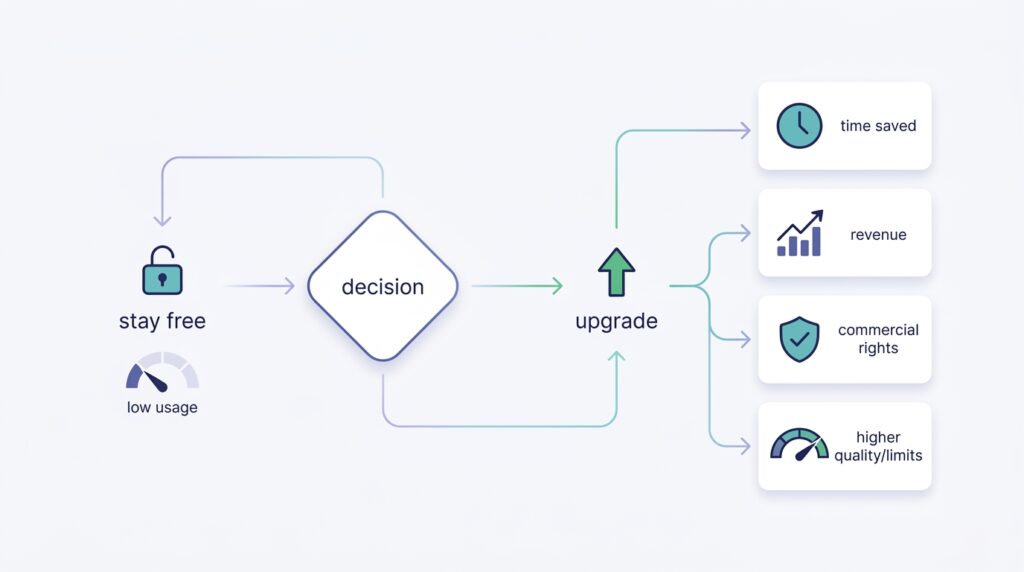
Free vs paid AI tools upgrade decision flowchart for 2026 based on time revenue rights and quality
Upgrade only when a tool saves time, lifts quality, removes a blocking limit, or helps you earn.

Stay free if you: are still testing, use AI occasionally, do not need commercial rights, are learning to prompt, create low volume, or are not earning from the workflow yet.

Upgrade only when a tool: saves you several hours a month, helps you earn money, requires commercial rights you do not have, needs higher export quality, hits a usage ceiling regularly, or has become part of your daily workflow.

The simple rule: if a free AI tool saves you at least five hours a month or directly improves your income, paying is an investment. If you touch it once or twice a month, stay free.


Common Mistakes to Avoid With Free AI Tools

1. Publishing AI output without editing. Unedited AI content reads generic and Google treats it that way. Add your own examples, screenshots, comparisons, and opinions.

2. Assuming “free” means unlimited. Almost every free tool has caps daily credits, monthly tasks, watermarks, slower processing, or weaker models.

3. Ignoring commercial rights. This matters most for AI images, music, video, and voice. Confirm the terms before using anything in monetized content, ads, or client work.

4. Using one tool for everything. No single tool wins every job. ChatGPT for ideas, Perplexity for research, Canva for design, CapCut for video, Tally for forms.

5. Chasing too many tools. You do not need 50 apps. Most people thrive on 5–7. Build a small stack around your actual workflow and stick with it.

My Recommended Starter Stack for 2026

This is enough for students, bloggers, creators, and small-business owners who want to use AI seriously without paying upfront.

Conclusion

The best free AI tools in 2026 are powerful enough to research, write, design, edit, automate, and study at a professional level without spending a cent on day one. But collecting every shiny app is the losing move. The winning move is to pick one tool per job, run that small stack for a few weeks, and then pay only for the one or two that clearly save time, lift quality, or make you money.

Start free. Learn what you actually use every week. Then an upgrade becomes an investment instead of another forgotten subscription.

FAQ’s

What are the best free AI tools in 2026?

The strongest free options include ChatGPT, Gemini, Claude, Perplexity, NotebookLM, Canva AI, Adobe Firefly, Microsoft Designer, CapCut, Grammarly, QuillBot, Descript, VEED, Zapier, Make, Cursor, GitHub Copilot, ElevenLabs, Suno, and Tally.

Are free AI tools really free?

Most have genuine free plans, but they come with limits — credits, watermarks, export caps, slower speeds, fewer models, or restricted commercial rights. Always check the current pricing and usage terms before relying on one for professional work.

Which free AI tool is best for students?

NotebookLM, Gemini, ChatGPT, Grammarly, and Canva. Together they cover studying, summaries, explanations, writing, presentations, and revision.

Which free AI tool is best for content creators?

CapCut, Canva, ChatGPT, Perplexity, Descript, ElevenLabs, Adobe Firefly, and Suno covering scripts, thumbnails, short videos, voiceovers, research, visuals, and music.

Can I use free AI tools for commercial work?

Sometimes, but it depends on the tool and plan. Always check licensing before using AI-generated images, music, video, or voice in monetized content, ads, or client projects.

What is the best free AI chatbot?

ChatGPT, Gemini, Claude, Microsoft Copilot, and Perplexity are all strong. ChatGPT is the best all-rounder, Gemini suits Google users, Claude excels at writing review, and Perplexity wins for research.

About The Author

Leave a Reply

Your email address will not be published. Required fields are marked *